


Message queues are an important tool in the resilient architecture toolbox. This article takes a system design approach to answer:
Why do queues exist and what problems do they solve?
How do queues work under the hood and what are the nuances and limitations?
When should you use queues and when aren’t they the right choice?
We’ll also cover back pressure, dead letter queue (DLQ), ordering, idempotency, scale behavior, durability, error handling, etc. using Amazon SQS, Apache Kafka and RabbitMQ.

An example
Let’s say you’re building a photo-sharing app like Instagram. When a user uploads a photo, we need to do a few things:
Resize it to common sizes that are used across the UI.
Assess the content against a content moderation policy to ensure compliance.
Fan-out notifications and update activity feeds.
…
The simplest implementation executes those operations sequentially in the same server:
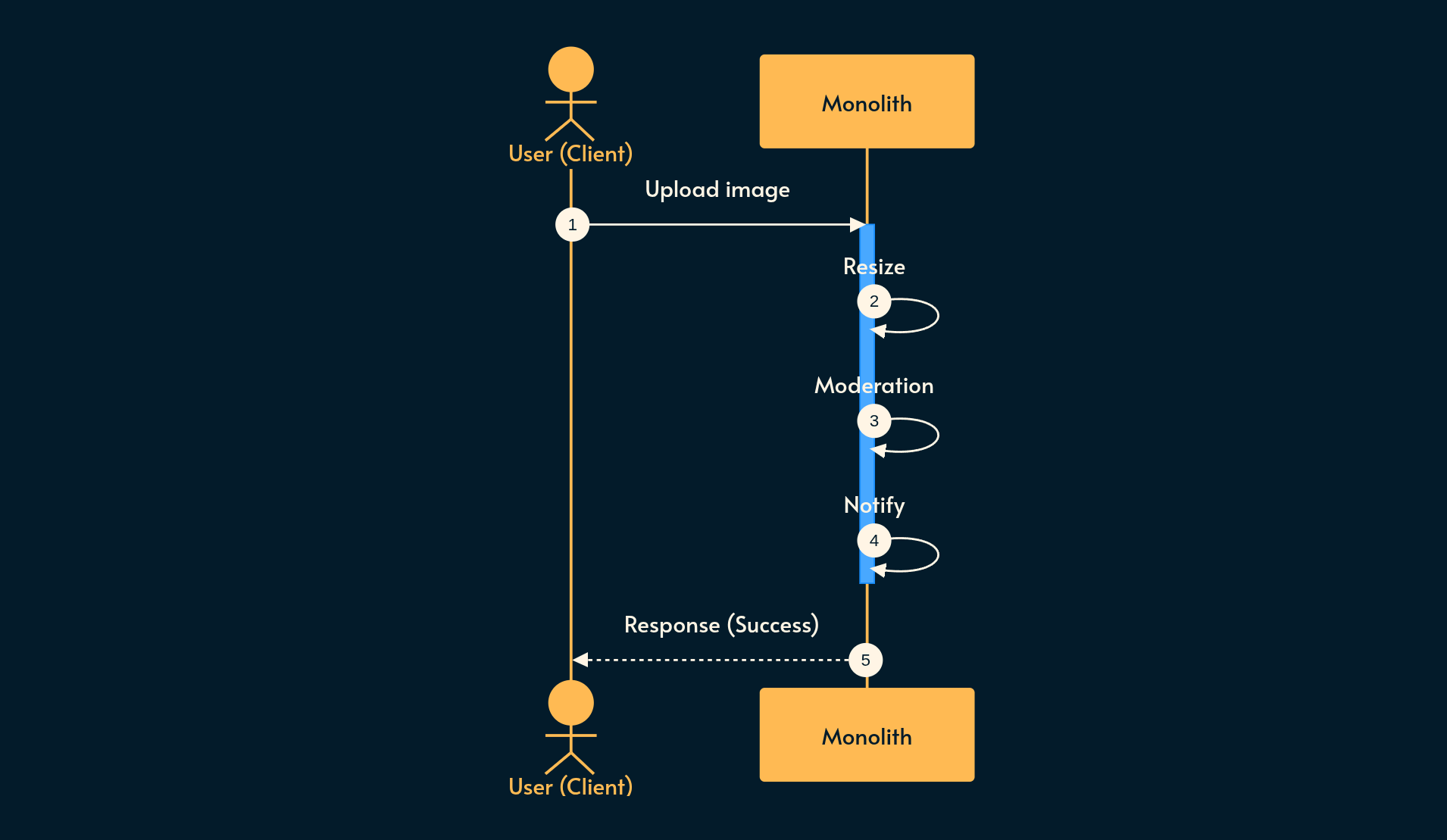
This has some drawbacks:
Latency: The user has to wait until all operations finish. Technically you can run the Resize and Moderation workloads in parallel but at scale, the server is going to be saturated and keep the user waiting.
Inefficiency: The Moderation workload may require a beefy GPU while the Resize workload may require more RAM. Shoehorning these diverse requirements into the same server increases its cost unnecessarily.
Fragility: If one step fails (e.g. Moderation), the whole upload operation fails. A retry would waste resources and time redoing the previous steps that were successful.
Traffic spikes: Maybe your app is featured in the app store, or due to ads or special events, user uploads increase dramatically. If we designed our service for a lower Non-Functional Requirement, a spike is guaranteed to hurt the user experience. You could provision extra resources in advance but not every spike is predictable. Plus, the redundant resources (e.g. server replicas) are just sitting there and costing money.

Breaking those steps into loosely coupled specialist services solves most of those problems.
This is where the queue enters the picture:
The user uploads the image to a web server
The web server puts it on the queue
The web server immediately responds “upload is done” to the user
The Resize, Moderation, and Notification services pick work from the queue in parallel.
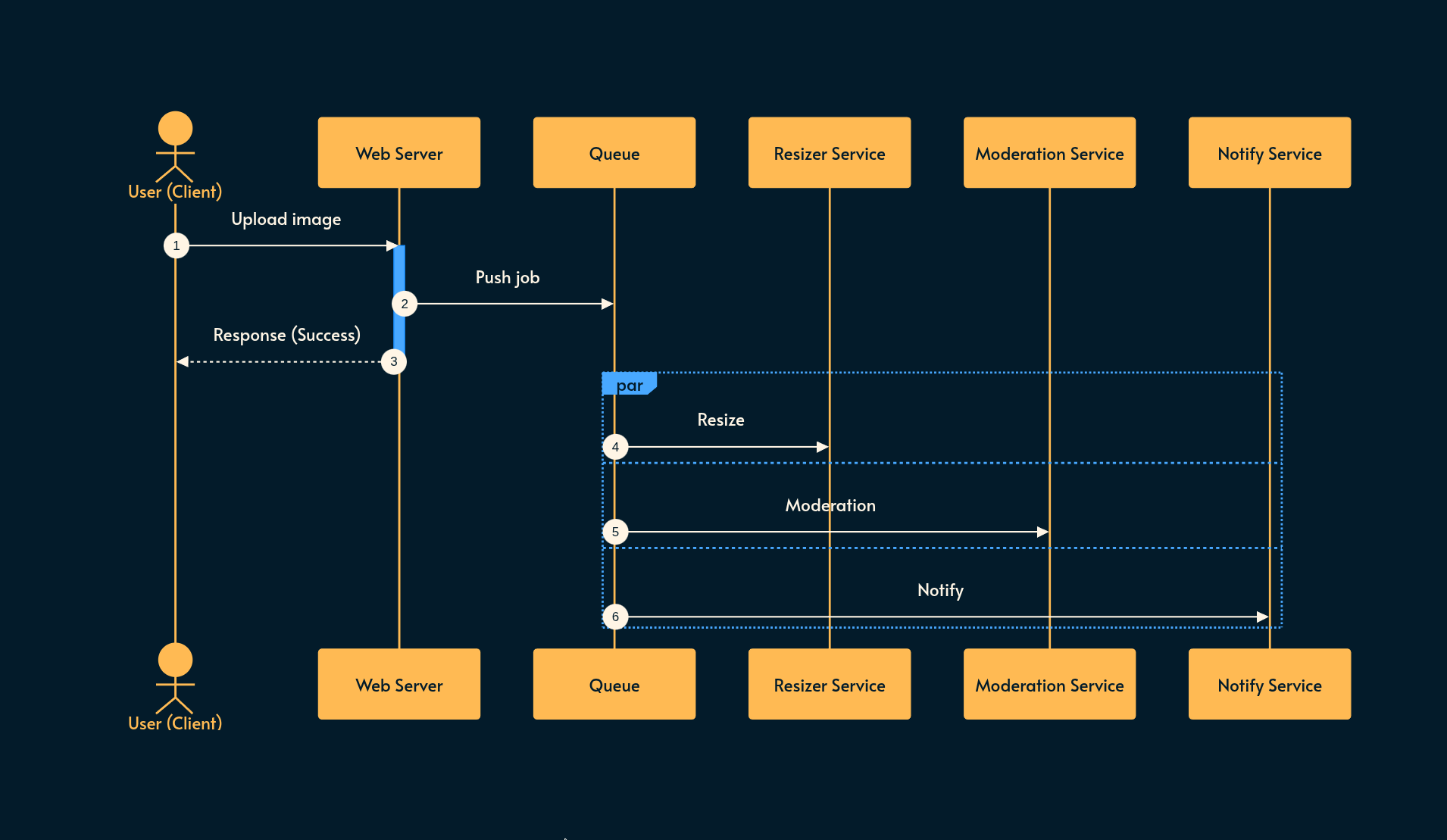
How has the queue improved our design?
Uploads are fast: Your server is just saving the file and dropping it onto a message queue, without waiting for processing.
Failures are isolated: If a worker crashes while processing a single photo, that message just gets redelivered to another worker, and it picks up where the other one left off.
Traffic spikes are buffered: When the traffic spikes, the queue gets longer instead of failing. We can also spawn new workers or kill them depending on the queue length.
What is a Message Queue?
A message queue is a buffer that sits between a producer and a consumer.
Producers: Create the messages that are put into the queue. For example, 5 users may upload 3 photos each. The web server produces 15 messages.
Consumers: Pick up those messages from the queue. In this example, the Resize, Moderation, and Notification services consume those 15 messages. There can be multiple instances of those workers, processing messages in parallel.
The queue’s job is to hold onto these messages until a consumer is ready to process them.
Queues decouple producers from the consumers. The producer and the consumer don’t know about each other. This allows them to scale independently and swap one or the other without affecting each other directly.
How do queues work under the hood?
There are a few mechanisms that you need to understand:
Acknowledgements
Preventing Duplicate Processing
Delivery Guarantees
1. Acknowledgements (ACKs)
Let’s say a worker pulls a message off the queue and starts processing the photo.
What will happen if it crashes halfway through the processing?
If the queue just deleted the message the moment the worker grabbed it, then that photo would be gone forever.
Acknowledgement is the mechanism that solves that problem.
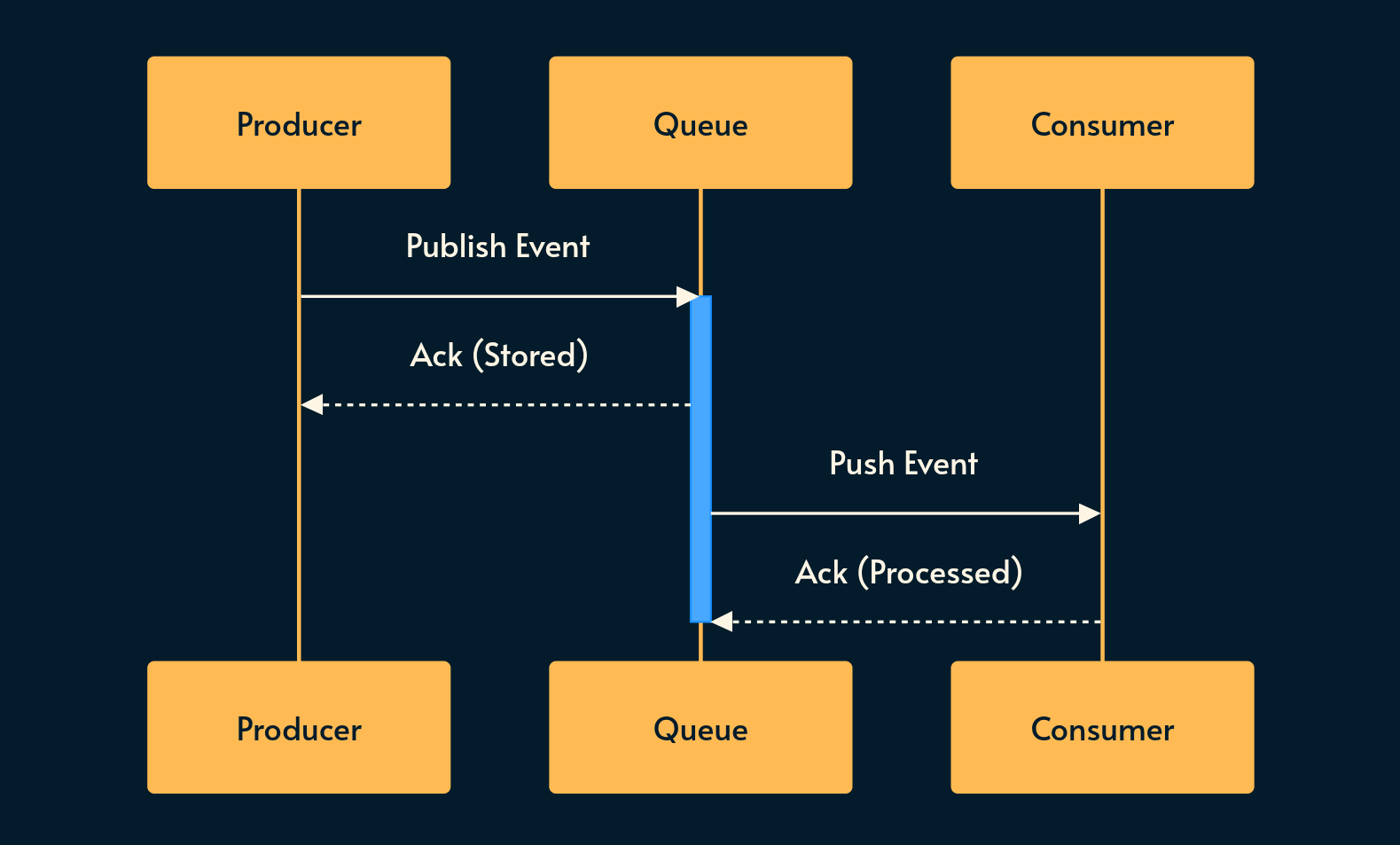
Instead of deleting the message, the queue waits for the consumer to explicitly send an ACK signaling that it’s done processing and the message can safely be removed.
If a consumer crashes before sending that ACK, the queue assumes it wasn’t processed, and that message ends up being redelivered to another consumer for processing.
Similarly, the queue may also send an ACK to the producer upon receiving the message. This adds to the latency but increases reliability.
2. Preventing Duplicate Processing
The queue holds onto messages until consumers ACK them. What happens if worker A is processing a message and worker B is checking for new messages?
We don’t want to waste resources for duplicated work or even worse, end up with inconsistent side effects.
Different products solve this problem in different ways:
AWS SQS: When a consumer picks up a message, it becomes invisible to all other consumers for a configurable window (from
0sto12h. Default:30s). If the consumer ACKs within that window, the message is removed (the consumer callsDeleteMessage). Otherwise, the message becomes visible again, making it available to another consumer.RabbitMQ: Just after sending a message to a consumer, it is marked as unacknowledged (
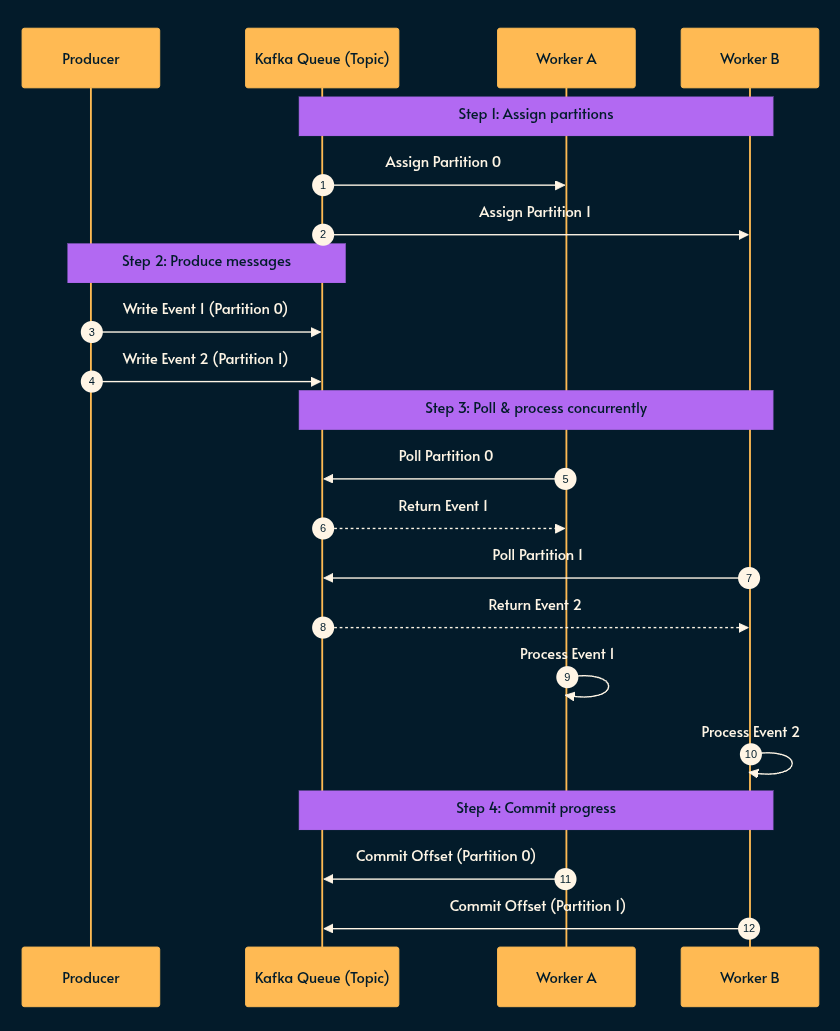
unack), preventing it from being sent to another consumer. If the consumer doesn’t ACK the message within a time window (default:30m), it’ll be available for other consumers. Note: if the consumer disconnects, RabbitMQ doesn’t wait that long and requeues the message immediatelyApache Kafka: It divides topics into partitions. Within a consumer group, Kafka enforces a 1:1 mapping where each partition is assigned to exactly one worker instance, so there’s no competition between consumers.
3. Delivery Guarantees
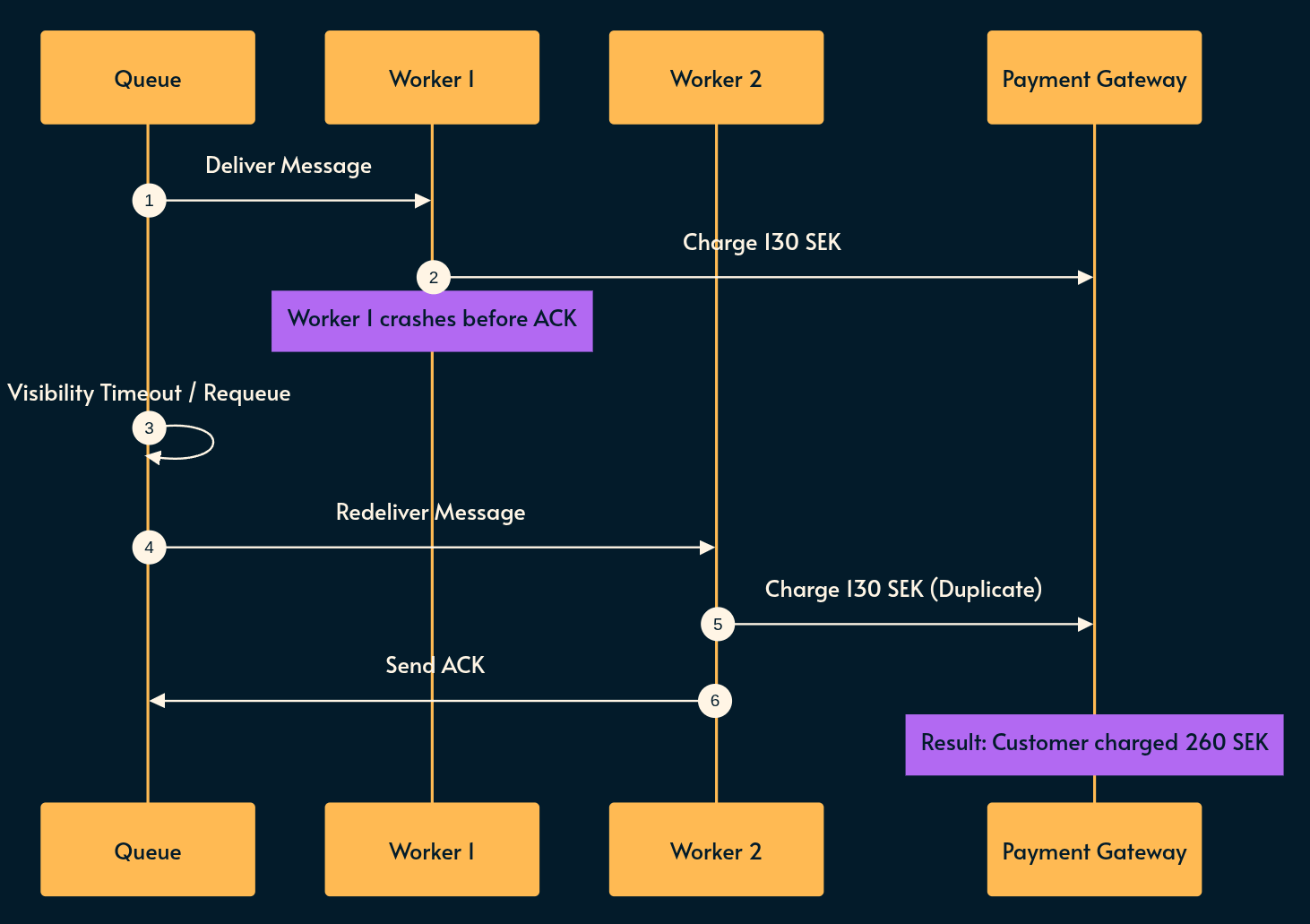
What if the worker processes the message successfully, but crashes right before sending the ACK? The queue thinks that it was never processed, so it redelivers it to another consumer.
In many cases (like our Resize or Moderation example), there are no serious side effects in doing the work multiple times. That’s because these operations are idempotent: executing them multiple times produces the exact same end state.
But what if there was money involved? For example, if a message charges the users 130 SEK, running this operation twice charges them 260 SEK! Financial charges are typically non-idempotent.
This is where delivery guarantees come into play and there are primarily 3 mechanisms that you should know about:
At-Least-Once: messages are guaranteed to arrive but duplicate processing can occur. This is the default behavior for SQS, RabbitMQ, and Kafka. This works fine when the work is side-effect-free or idempotent:
✅ Updating the user name to
“Aleksander”is idempotent because the end state is the same.❌ Increasing the view count by N is non-idempotent because every execution increases the view count by N.
At-Most-Once: messages are never duplicated but data can be lost if a worker crashes mid-processing because the ACK is sent immediately upon receiving the message. If something goes wrong, at most one worker processed it; at worst, nobody processed it. You can use this approach when losing a few data points is acceptable.
Exactly-Once: the message is guaranteed to be processed exactly once but it’s very hard to implement. This is the Two Generals’ problem. In practice, it’s implemented by combining At-Least-Once delivery with an idempotent consumer (e.g. using deduplication keys or database transactions).
When to Use a Message Queue
There are four signals you should look for:
Async Work: When a user doesn’t need an immediate result (e.g., sending an email, generating a report, processing uploads).
Bursty Traffic: The system should be able to absorb traffic spikes without dropping any requests. The queue acts as a buffer that smooths out the load on consumers.
Decoupling: Your producer and consumer might have completely different scaling or hardware needs. In the image processing example, the upload services just accept the file and drop it into a queue while the Resize worker may need more RAM and the Moderation worker may need more GPU. Decoupling unlocks scalability and efficiency by speccing those workers accordingly.
Reliability: When you can’t afford to lose work. If a downstream service is temporarily unavailable, the queue holds onto that message until it comes back online, ensuring nothing is lost.
⚠️ Note on latency-sensitive workloads: Be careful introducing a queue into a synchronous workload with strong latency requirements (e.g. sub-500ms). Adding a queue nearly guarantees you will break that NFR constraint. Queues are for work you can afford to do later, even if “later” is a few seconds.
Nuances
1. Partitioning
A single queue has its throughput limits.
Partitioning allows horizontal scaling. You basically split the intake into multiple independent sub-queues. Different workers can then consume different partitions in parallel.
A consumer group is a pool of consumers that divide those partitions among themselves:
✅ If you have 8 partitions and 2 consumers in a group, each consumer handles 4 partitions.
⚠️ If you need more parallelism, you can add more consumers but there’s a limit: you cannot have more consumers than the number of partitions in a single consumer group.
❌ If you have 8 partitions and 8 consumers, adding a 9th consumer doesn’t help because there is no partition left to consume from.
Each partition has a key. That is how you decide which message goes into which partition.
Choosing the right partition key is as important as choosing a database shard key because:
Ordering: Messages with the same partition key always go to the same partition where the ordering is guaranteed. This ordering is important when the operations are non-idempotent and the side effects depend on the order of processing (e.g. the bank transactions example).
Even Distribution: You want your partition keys to spread work across partitions evenly. For example, if you’re building a ride-sharing app, you don’t want to partition by the city because the large cities get a hot partition while the smaller cities starve their allocated workers. In this example, you may want to partition by
user_idorride_id.
Trade-off: The key that gives you strict ordering might not always be the key that gives you the best distribution. You should spend some time thinking about this trade-off.
2. Back Pressure
If producers create messages faster than consumers can process them, the queue grows until it eventually runs out of memory.
What’s the solution?
Autoscaling: automatically spin up more consumers or add partitions based on the queue size.
Back Pressure: Reject new messages or return an error asking the clients to retry later.
Alerting: As a last resort, you should always connect monitoring to alerts on queue depth so you know when a backlog is reaching its critical size.
3. Poisoned Messages & DLQ
Sometimes a message fails to process regardless of which consumer picks it up. There can be many reasons: it may be malformed, contain an invalid state, or have a payload that the consumers aren’t able to process. It may even be a bug in the consumer’s code.
This is called a poisoned message.
Instead of wasting resources and trying indefinitely, we set a max retry count. If consumers fail to process it after that limit, it’ll be moved to the Dead Letter Queue (DLQ).
A DLQ is a separate queue (or separate partition) where failed messages go for further investigation by an admin, engineer or AI.
Again, you should have alerting on the DLQ to make sure you don’t miss opportunities for improvement.
4. Durability & Fault Tolerance
So far we talked about the queue as if it’s always available but in practice, it’s an SPOF (single point of failure).
What happens if the queue goes down?
Modern message queues like Kafka persist messages to disk with a configurable retention window (e.g., 1 day, 1 week, or indefinitely) and replicate them across multiple brokers (servers). If one broker goes down, another replica has the data (similar to read replicas in databases), so no messages are lost.
The retention window also has another advantage: you can replay messages from the past: If your consumers go down or process data incorrectly due to a bug, you can deploy a fixed consumer and tell it to reset its offset to process past messages again.
Reliability Engineering Mindset

NOTE: This book is completely free and gets updated as I learn more. If you want to support my work, you can chip in buying a subscription but beware that it doesn’t unlock the content. Your contribution is a gift I highly appreciate of course but the content is free
Kafka vs. SQS vs. RabbitMQ
Let’s do a quick comparison between the most common message queue products.
1. Apache Kafka
Kafka is a distributed streaming platform. Messages are written to disk and retained for a set period rather than deleted immediately upon consumption.
It is the most popular choice and best suited for high throughput, durability, event streaming, and replaying data.
It scales using partitions and consumer groups.
2. AWS SQS
Amazon SQS (Simple Queue Service) is native to AWS and is a managed service which is quick to set up and relatively simple.
It comes in two flavors:
Standard Queue: Offers maximum throughput with best-effort ordering and At-Least-Once delivery.
FIFO Queue: Guarantees strict ordering and Exactly-Once processing but has lower throughput.
3. RabbitMQ
RabbitMQ isn’t as popular as the other two. It’s written in Erlang and uses concepts like exchanges and bindings for message routing.
It’s used for traditional message broker setups requiring complex routing logic.
Conclusion
To wrap things up:
Message queues decouple your producers from your consumers.
They buffer bursty traffic so nothing gets dropped.
They distribute work across pools of workers.
If you’re preparing for a system design interview, here’s a good video from hello interview that talks about this topic.
My monetization strategy is to give away most content for free but these posts take anywhere from a few hours to a few days to draft, edit, research, illustrate, and publish. I pull these hours from my private time, vacation days and weekends. The simplest way to support this work is to like, subscribe and share it. If you really want to support me lifting our community, you can consider a paid subscription. If you want to save, you can get 20% off via this link. As a token of appreciation, subscribers get full access to the Pro-Tips sections and my online book Reliability Engineering Mindset. Your contribution also funds my open-source products like Service Level Calculator. You can also invite your friends to gain free access or save via a group subscription.
And to those of you who already support me, thank you for sponsoring this content for the others. 🙌 If you have questions or feedback, or you want me to dig deeper into something, please let me know in the comments.
The SQS duplicates that show up most in practice come from the visibility timeout. It defaults to 30 seconds, so a moderation call that takes 45 seconds on a busy GPU gets redelivered and a second worker starts the same photo. Size the timeout off p99 processing time and keep the idempotency check as the backstop.