


You probably know what prompt caching is (if not, there’s a quick intro) but what you may not know is the massive impact it has on cost per task (the token cost to do something).
This is a short visual article based on real data from my own coding tasks to show:
What prompt cache is, how it works and why it’s important?
How to optimize your cache for deliberate cost reduction.
Declaration: no AI is used in this article.

Understanding LLM APIs
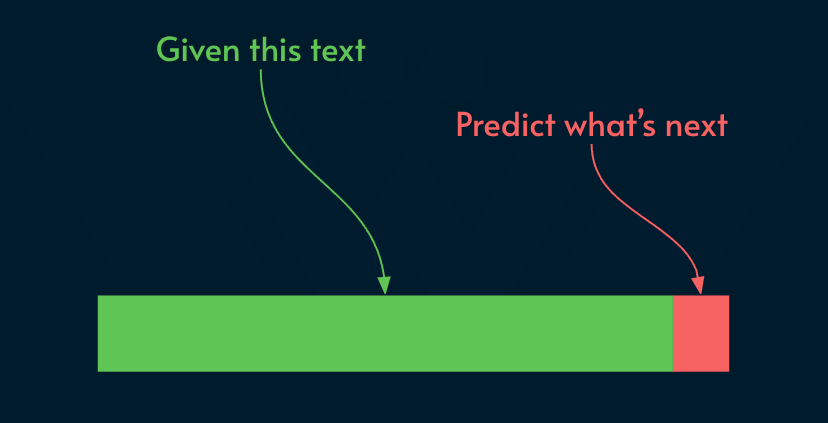
The most common LLMs are auto-regressive meaning they predict future tokens based on a given set of tokens:
Note: there are also diffusion models, for example Gemini Diffusion but for agentic workflows, auto-regressive dominates the majority of use cases.
In the diagram above the green part contains:
System instructions:
System prompt: high level instructions including persona and tone
Tool declarations: to let the model know what tools are available
Skill declarations: to let the model know of task-specific instructions
Session history: what happened up until here (empty in a fresh session)
Extra context: (optional) open files, attachments, RAG, etc.
User prompt: what did the user ask
Quick note on “declaration” vs “definition”, both terms borrowed from programming languages like C/C++. Declaration is a thin announcement on “what it is” whereas definition contains the actual meat of “how it works”.
While languages like Python and JavaScript combine these two steps, the distinction is crucial for languages like C. Declarations are often put in header files (*.h) while definitions reside in the code files (*.c) that compile to binary. Although LLMs don’t compile natural language, but since the mechanics of tool/skill declaration/definitions are roughly the same, I use those terms.
To the model, these are all tokens. Upon receiving the request, the inference engine does 3 things:
Tokenization: mapping string to numbers that the model can understand.
Prefill: compute the KV Cache (key-value cache) which acts as the model’s short-term memory containing the attention state.
Decoding: generating output, one token at a time.
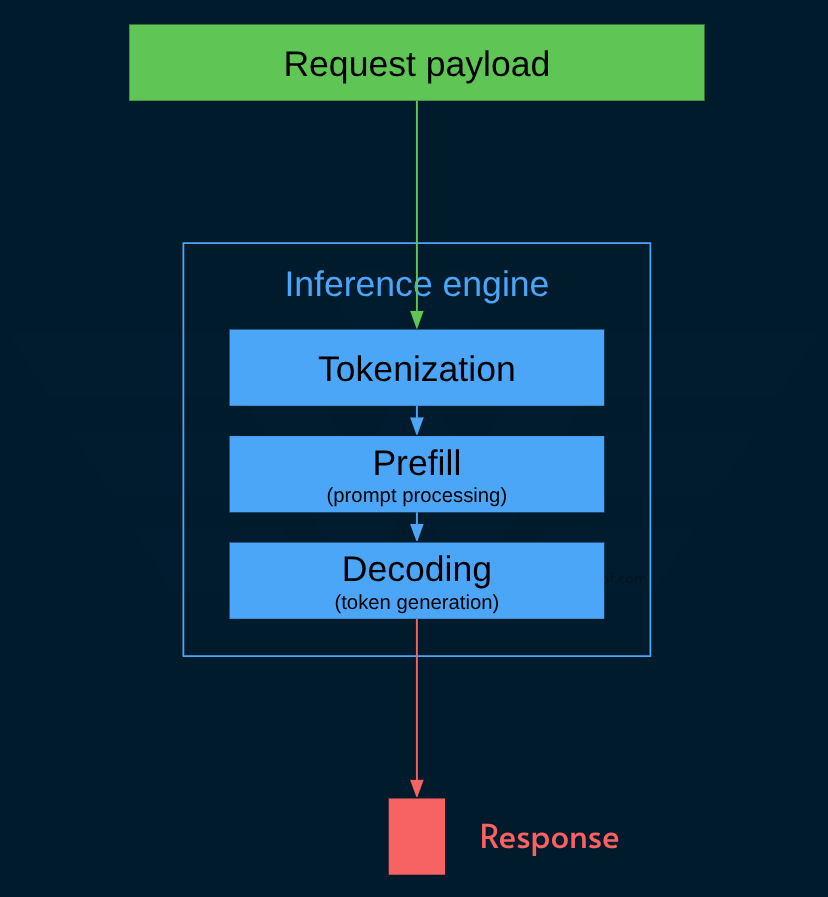
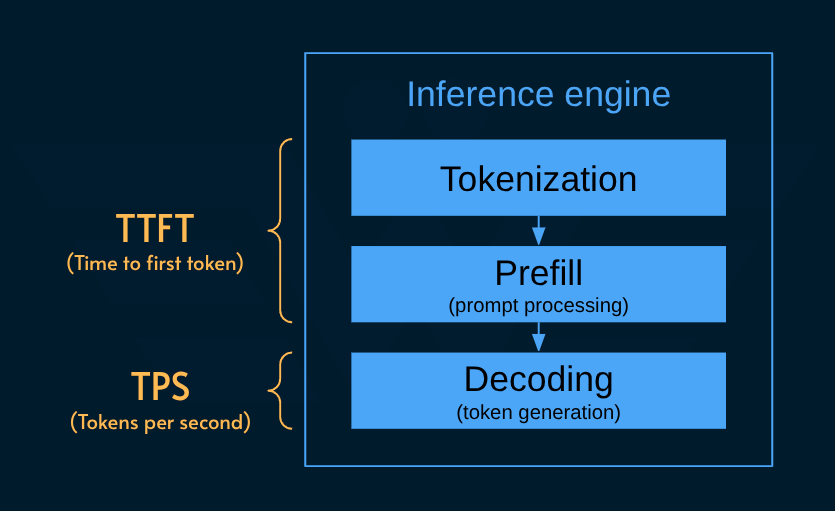
The three phases impact two distinct metrics:
TTFT: the delta between when the request is received till the first token of the response is ready
TPS: tokens (decoded) per second
I’ve skipped the irrelevant details to keep it focused on the topic (cache optimization) but what you need to know is this:
Prefill is compute-bound and heavily parallelizable.
Decoding is memory-bound and serial because for every token, the entire model weight and the growing KV cache must be processed.
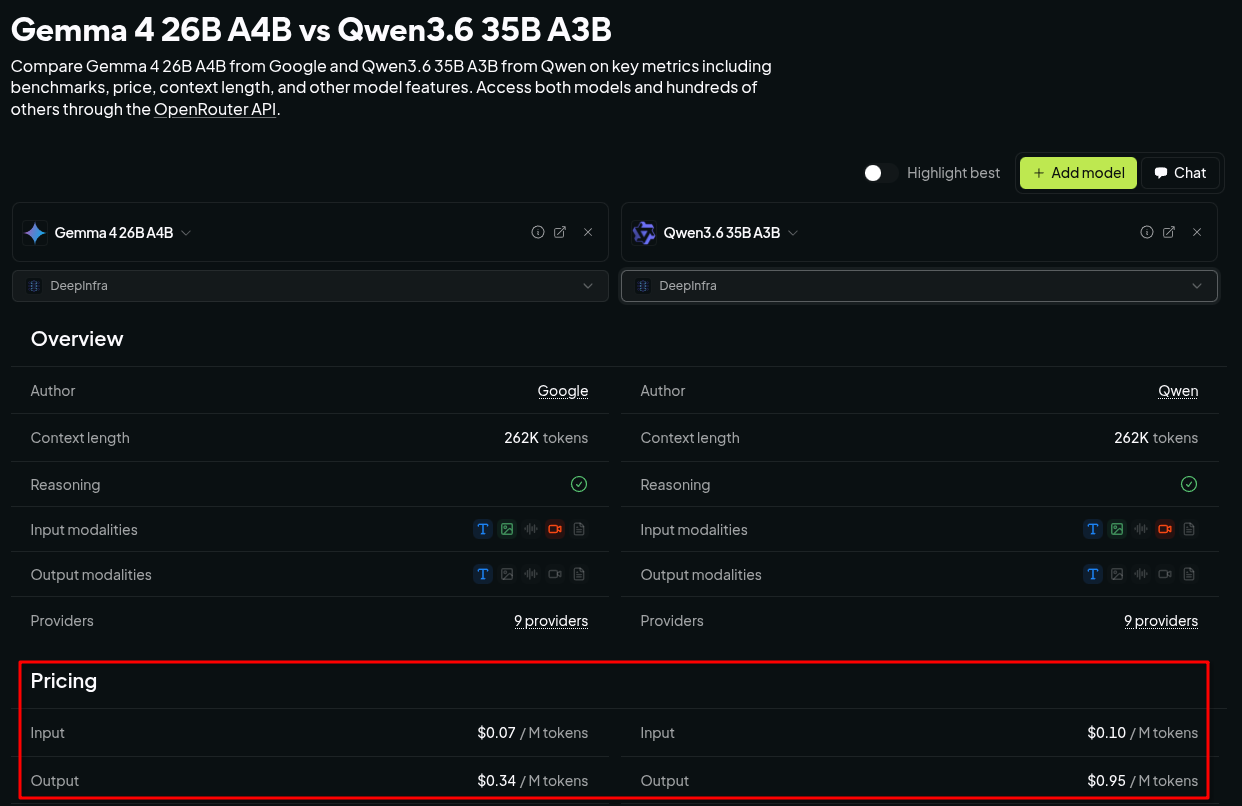
The this shows in the API pricing model:
Input pricing: much cheaper because it takes less time
Output pricing: significantly more expensive (3x-10x) because the serial processing takes more time.
Here’s an example showing prices of two models on the same provider:
You might be using local models, but the “cost” still holds in terms of time and performance. Here’s an example of a simple workload I ran locally:
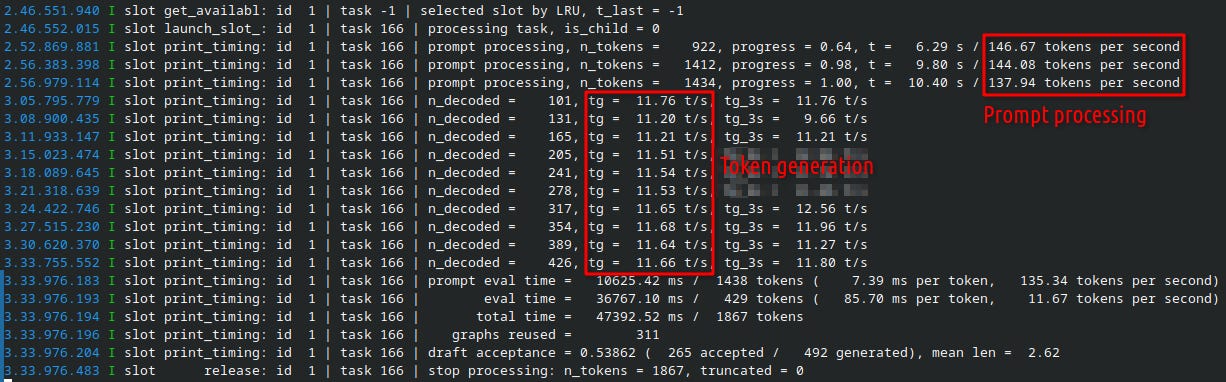
Here are the results using Gemma 4 26B on llama-cpp:
Prompt processing:
140+TPS and took10sToken generation:
~11 TPSand took36s
That costs time and electricity so it’s not free.
OK, you probably know where this is heading! Let’s switch gears and see how prompt caching comes into the picture.
What is prompt caching
The concept is very similar to how conventional API caching worked before AI.
The server caches the expensive computations for a period of time.
Upon receiving a request, it checks the cache:
Cache hit: a similar payload is already processed. Using it skips the heavy computation, which reduces the cost and increases TTFT
Cache miss: no similar payload was processed before: pay the full price of computation (higher cost and TTFT).
This happens opaquely, meaning the user doesn’t know for sure if their request can be cached or not.
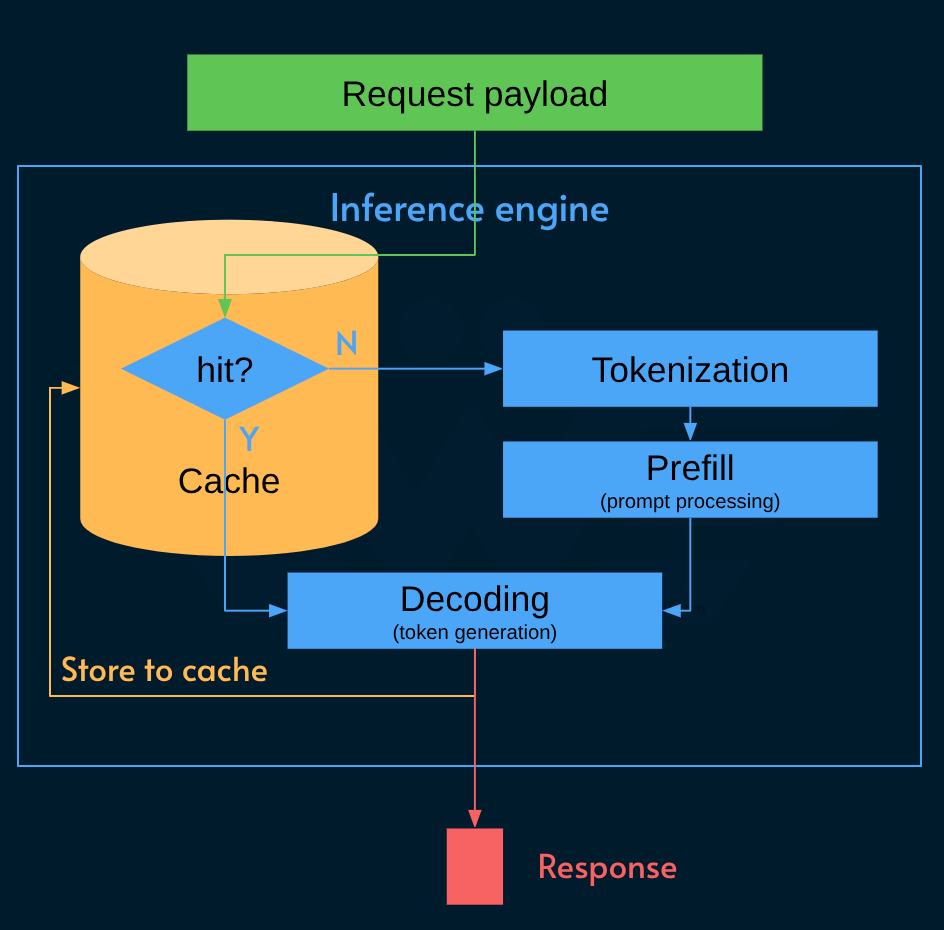
No rocket science there, but you need to remember that the result of decoding is likely to come back in the next request. That’s why it’s stored in the cache.
Another [obvious] point is that although cache is cheap, it’s not free. Therefore an LRU (least recently used) algorithm regularly evicts old entries from the cache.
Note that caching the output is not done for idempotency: the API isn’t designed to return the exact same response to the exact same request! If you have that kind of workload, you should maintain your cache outside the inference API. The KV cache is primarily for reducing the computation when generating output.
Here’s the cache pricing from DeepSeek (they’re going to increase it soon):

And here’s Gemini 3.6 Flash pricing:

Anthropic and OpenAI both use a more complex cache pricing model where cache storage is also factored in to the calculations just like Google.
How to optimize cache for agentic workflows?
Now the juicy stuff!
To understand how to optimize prompt caching, we first need to look into what is being cached.
As mentioned, the request payload (AKA prompt prefix) is composed of multiple parts:
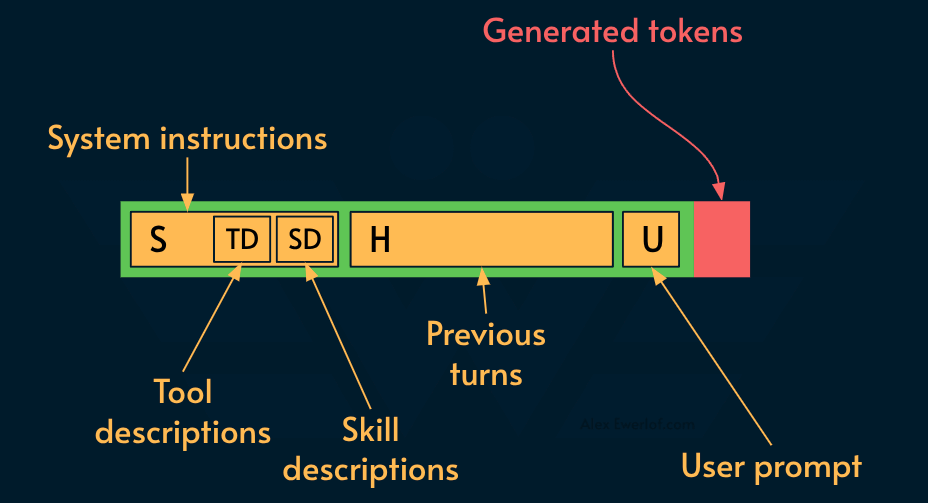
The tool and skill descriptions let the LLM know what’s available while the “extra context” depends on the harness (e.g. VS Code Copilot may add the name of the file currently open in your IDE while Claude may convert a PDF and append it to the user prompt).
As your conversation grows, you keep sending all those parts to the LLM:
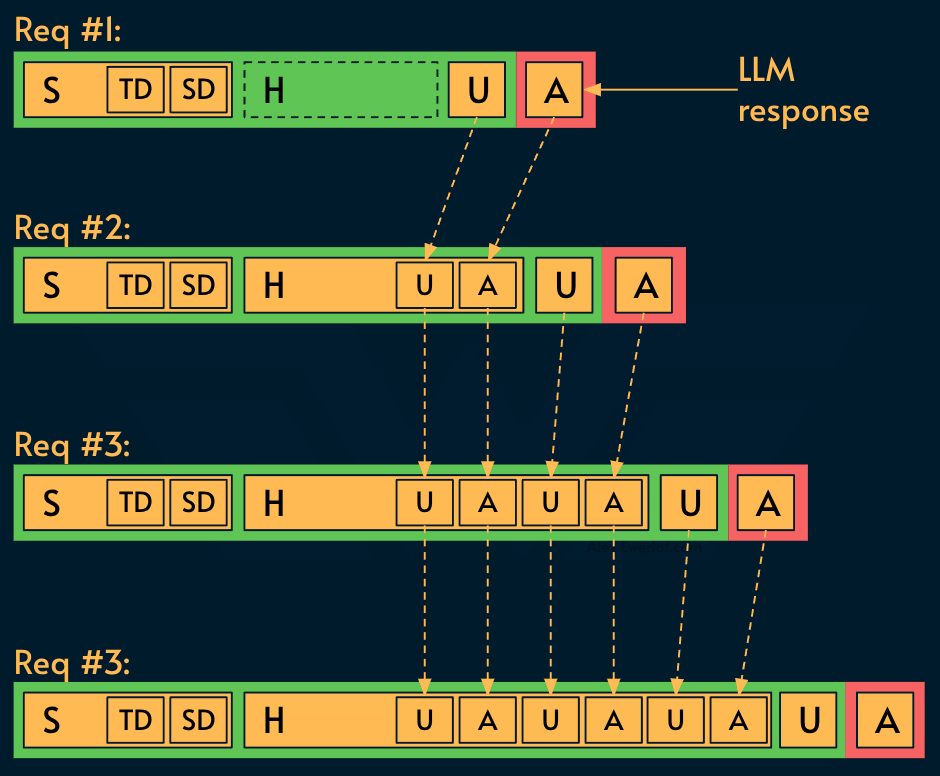
Whether it is cached in the inference engine or not, the LLM needs the entire KV cache for its token generation.
But what is cachable? Most of the session history in consecutive requests:
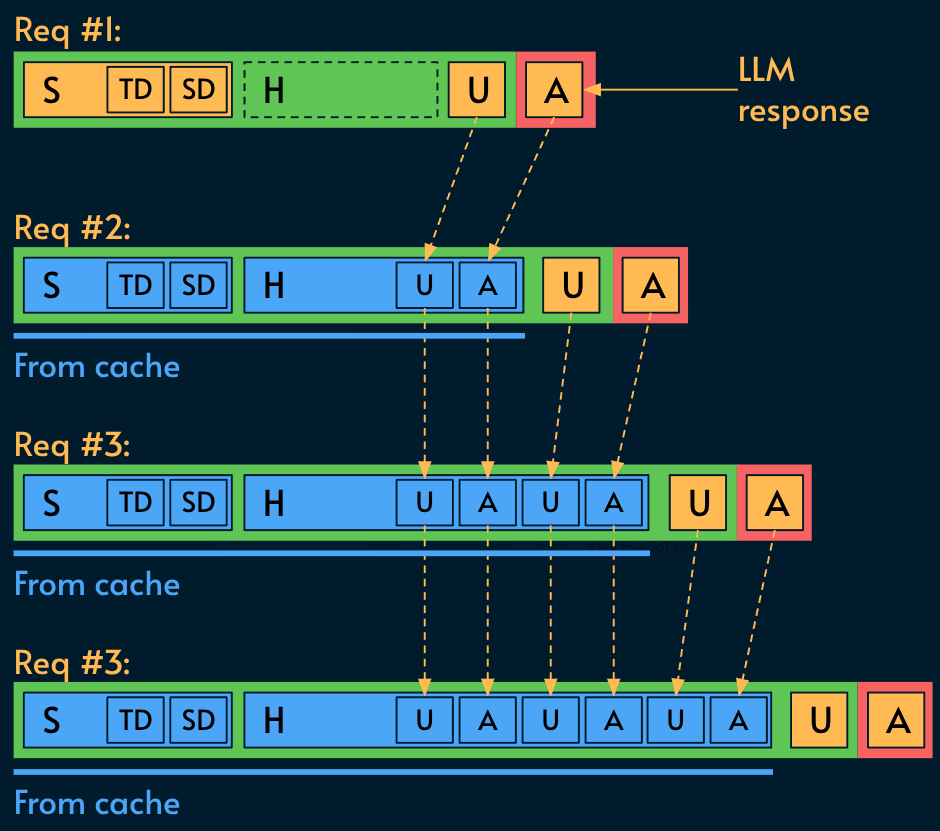
And this is the key to cost saving and speed in agentic workflows as each turn of the conversation can reuse a chunk of the growing cache.
Here’s the pricing for the same 4-turn agentic workflow with or without cache:
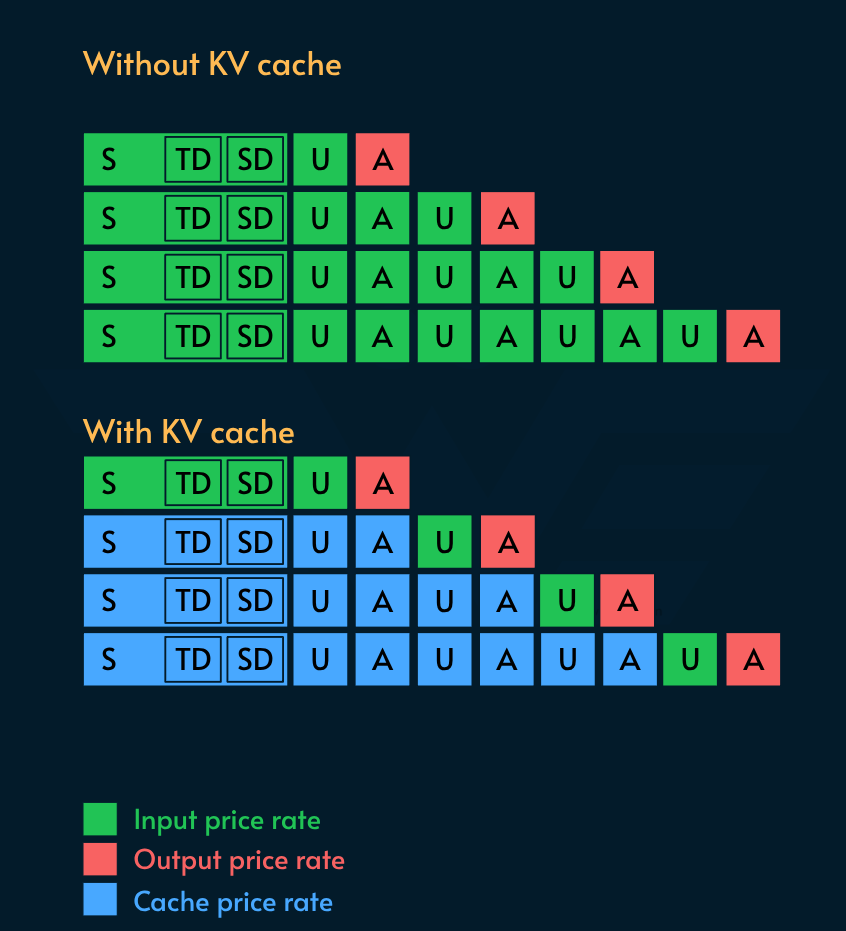
There is a catch [no pun intended] though!
If you change a single character in the cache, everything from that point will be invalidated.
Let’s say we change the list of tools available in the middle of the conversation. That means TD (tool declarations) and everything after it need to be computed again:
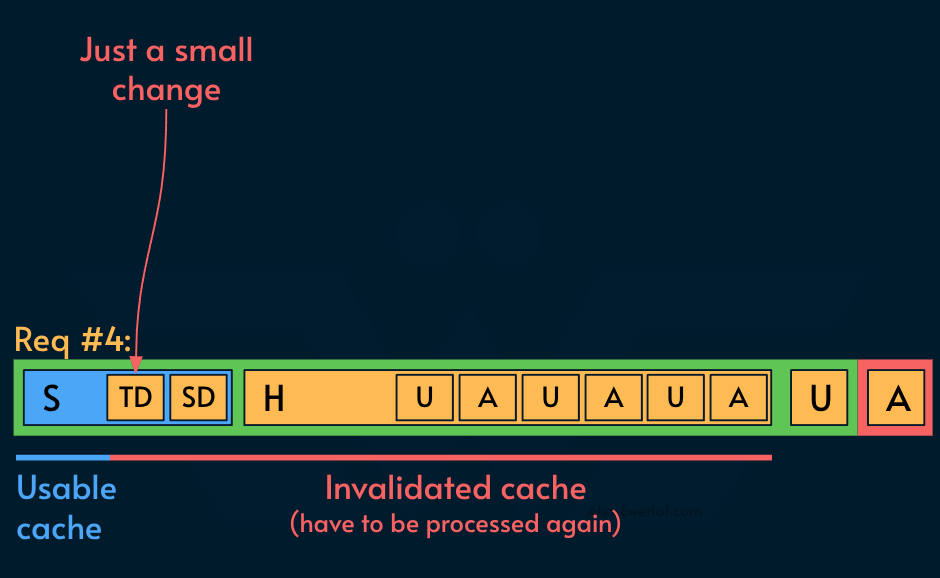
If you don’t want to pay cache miss prices, you should treat the session as immutable and avoid modifying it. If you mutate it, the earlier the mutation, the more of the cache you miss, leading to higher cost and delay.
System prompt
In the previous diagrams, we represented the tool and skill descriptions with two tiny squares. In reality, they can be the lion share of the system prompt and there’s huge opportunity for optimization.
Here’s an example from my real workflows. I analyzed 3 agentic coding sessions and got these numbers:
Tool descriptions: 13.5k tokens
Skill descriptions: 2.5k tokens
The raw system prompt (“You are a helpful assistant…”) were merely 1-8k tokens (depending on the task and harness).
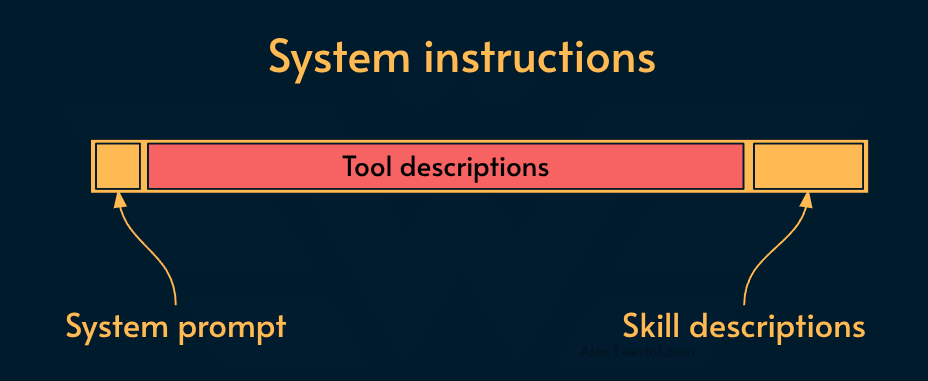
In VS code some 50+ tools are included by default:
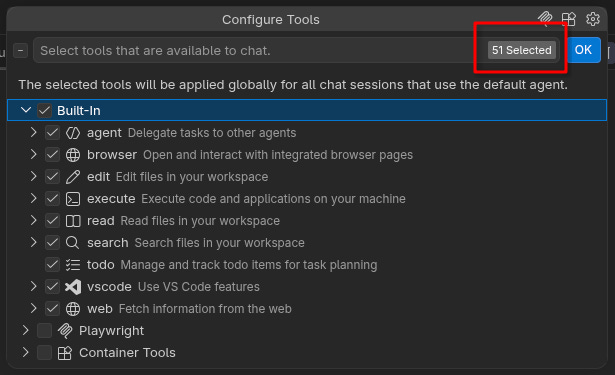
For comparison, Pi only has 4 tools: read, write and edit files + bash.
This makes Pi a much leaner option for local agentic coding because the prompt processing (prefill) phase on consumer hardware can be significantly compute-heavy.
Tips for tools & skills
Regardless of the harness, here are a few pragmatic tips:
Right after starting a session, choose the available tools before sending the first prompt to the LLM. As a side benefit, this also improves the quality of the agentic work because models tend to get confused when exposed to more than 30-50 tools (depending on model).
The situation for skills is more tricky because the harness usually assembles a list from the local and global skill folders and you have no control over it. One tip is to put your skills in a repo-local location (e.g. stored in .agent/skills) instead of relying on global location (~/.agent/skills). This allows you to limit the available skills to what’s relevant in a given repo.
Do NOT change the available tools or skills AFTER a session has started especially if it’s a longer session. If you must, compact the session before mutating early tokens (system prompt).
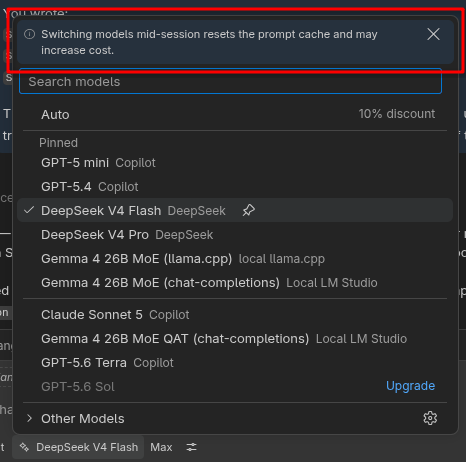
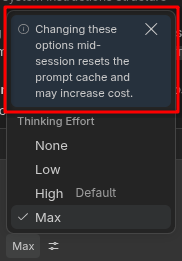
Session affinity: use the same model for the whole session. Changing the model or its config (e.g. thinking effort) mid-session, invalidates the cache.
That last item is why you see warnings like these in VS Code:
Session history
We showed the session history (earlier conversations) like this:
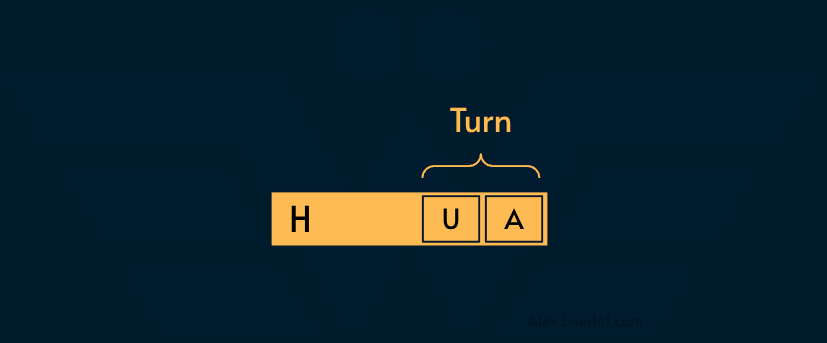
H=session history
U=user prompt (or the LLM, in an agentic loop setup)
A=assistant response
As the session grows, there will be more and more tokens in the KV cache:
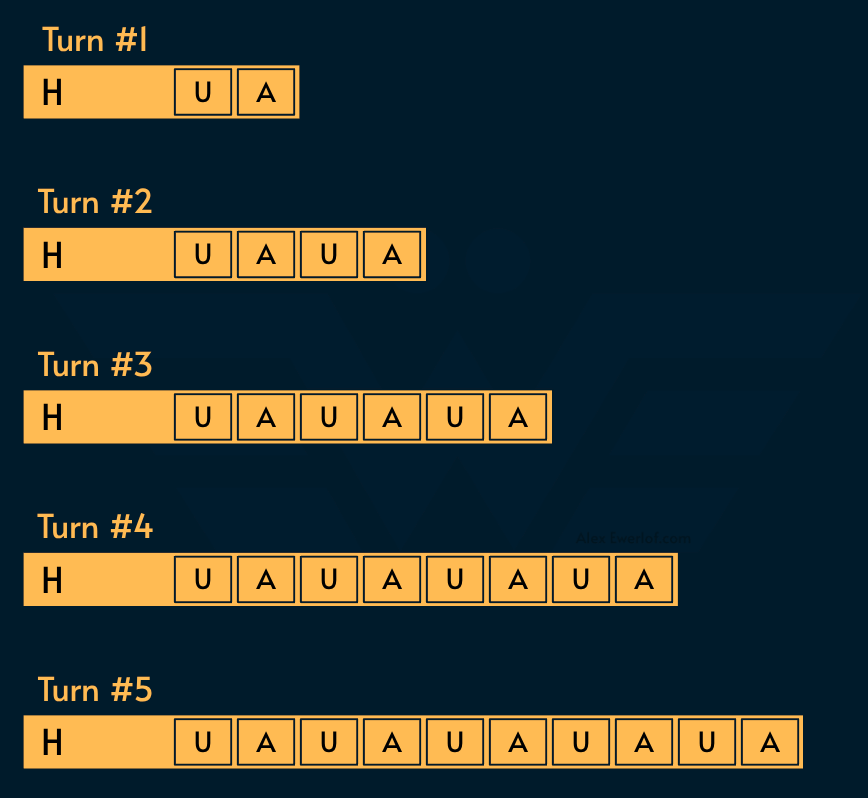
The longer the session, the longer it takes to process it. The computation time increases quadratically: O(N²). Doubling the prompt length quadruples the prefill time.
Fortunately, this is very cache-friendly:
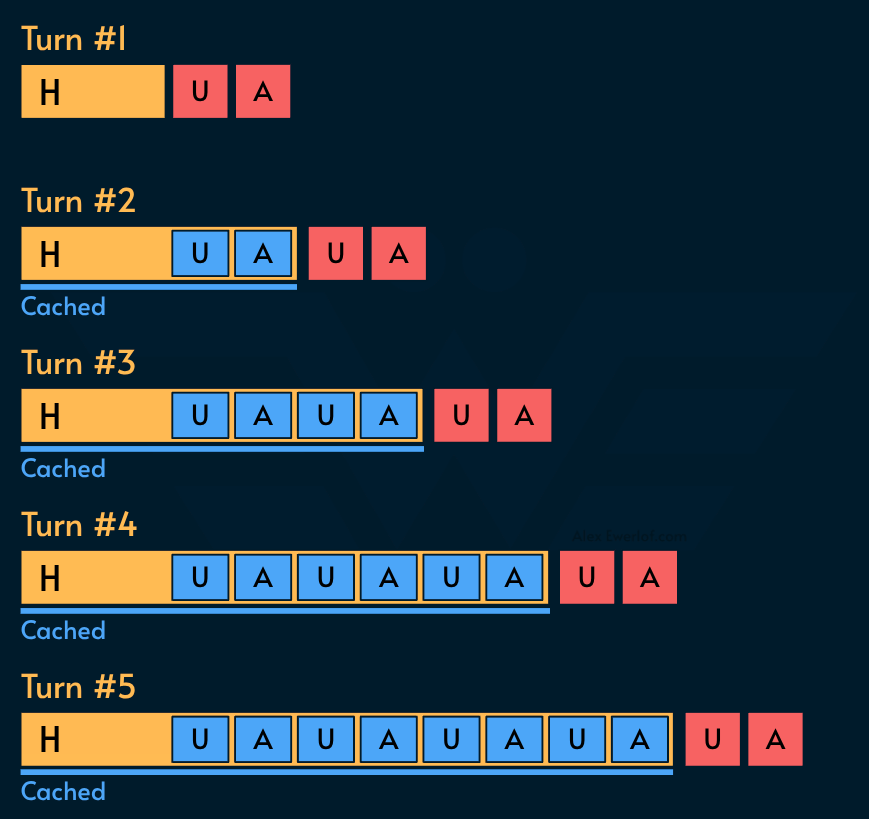
A typical agentic workflow takes anywhere from 20-200 turns the majority of which is tool calls:
LLM specifies the tool parameters for a call
Harness adds the result of the tool to the session
Both of these can be quite big (analyzing a few of my sessions, a single tool invocation+result adds 1-3k tokens to the context window).
Now we have another thing to think about: as the chat session grows, the size of KV cache grows, negatively impacting the token generation (TPS) speed.
Unlike prompt processing (prefill) which increases quadratically with total input length O(N²), token generation latency increases linearly with the KV cache length: O(L). In other words, the longer the session gets, the lower the TPS goes.
However, unlike prefill which can be cached, generating every token requires processing the entire KV cache.
Your context window might be 1M tokens, but that doesn’t mean that token #900,000 is generated at the same speed as token #9000.
There are primarily 2 ways to address this:
Start a new session: this is not recommended mid-task.
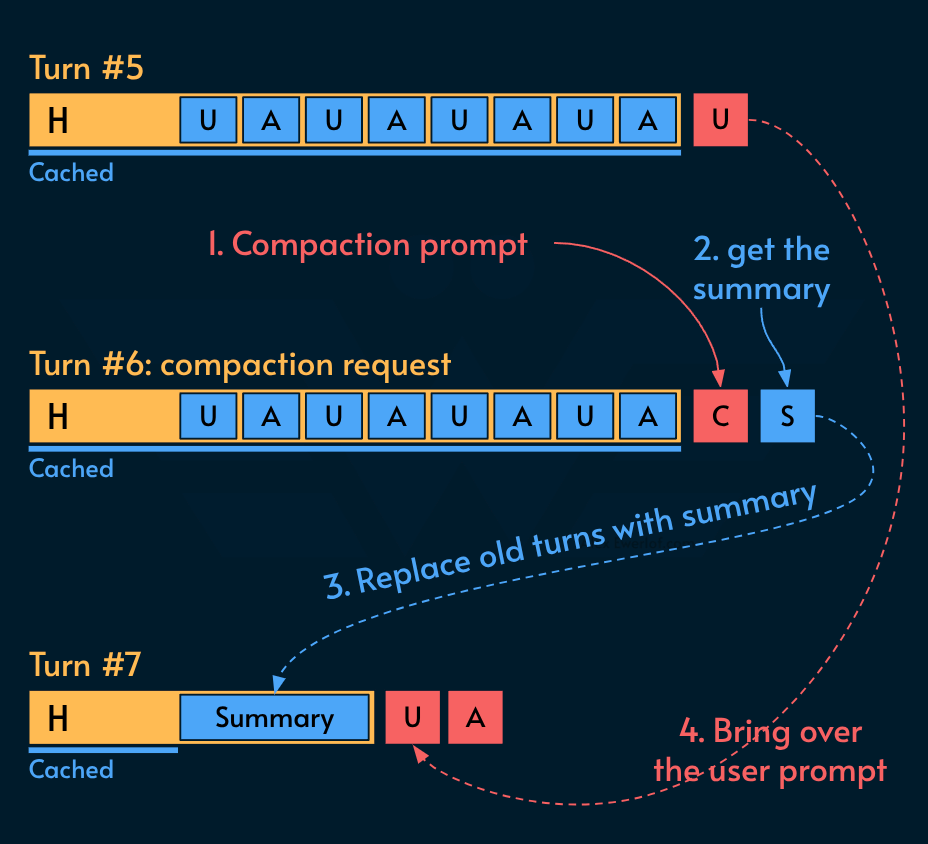
Session compression: (AKA compaction) retain important information while collapsing the old turns into a summary
There are two ways to compress a session:
Manual compaction: the user types a
/compact [optional instructions]prompt which will be paired with a predefined compaction prompt to get a summary.Automatic compaction: the harness keeps tabs on the session length and initiates the compression as needed.
Here’s the automated compaction flow:
Tips for session history
Use this heuristic:
Before typing a prompt ask yourself: does the model need the session history up to this point? If not, start a new session.
If the answer is yes, ask yourself: does it need the exact conversation or can it do with a summary? If yes, compress the session.
Compression has a cost. You’re practically invalidating a cache that otherwise would be a hit and replacing it with a conversation summary which should go through the prefill phase on the next turn. If you trigger compression too frequently, you may actually spend more compute and money than proceeding with raw session.
Compression is lossy, meaning some information may be lost. Typically the harness comes with a pre-tested compression prompt that puts more weight on the latest turns than the middle of the conversation. This means some critical pieces of information (e.g. error codes) may get lost, negatively impacting the LLM performance.
Use the optional instruction to tell the model what to bring to the summary. You make that decision based on where you want the conversation to go in the rest of the session.
Different models have different prices. You can use that to your advantage. For example, you may start a planning session with an expensive and smart model but continue the implementation (which involves many turns and can get exponentially expensive) using a cheaper model. In that sense, the smarter model guides the cheaper model. Changing model mid-session incurs a cost because the KV Cache gets invalidated but it is worth it for tasks that take many turns because the repeated usage of the cheaper model offsets that cost penalty.
Bonus: subagents
We’ve established that as your session grows, its cost exponentially grows as well (cache helps but doesn’t eliminate the cost).
One trick is to use sub-agents. The name might be scary but think about it as a subroutine that specializes on doing a single task.
This unlocks a few potentials:
The subagent can use a cheaper or faster model or a different set of skills (this means the parent agent doesn’t have to have all the skills)
The subagent starts on an empty context window, which means it costs less.
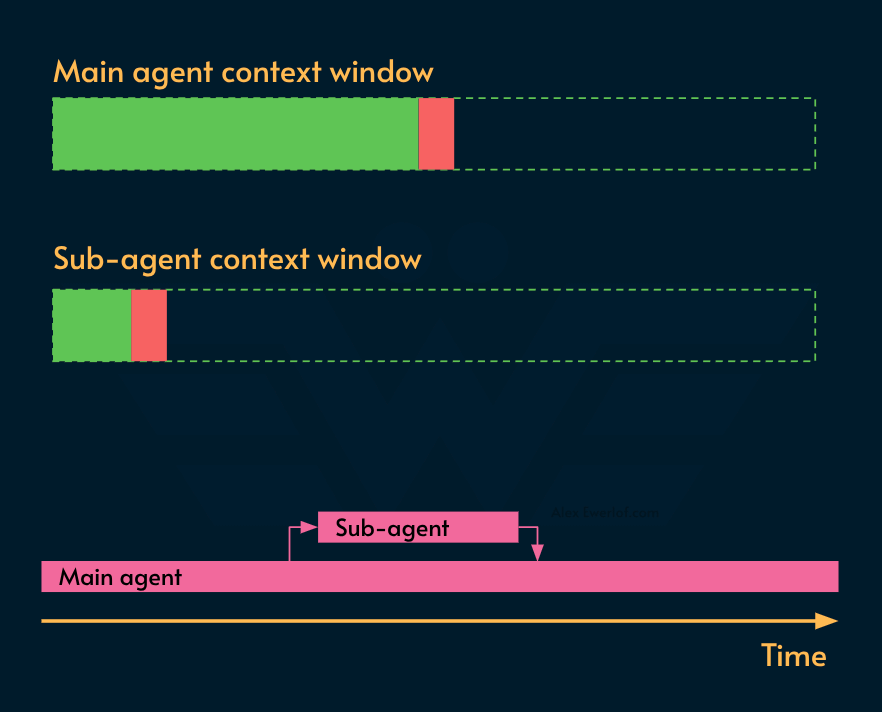
The downside is that the subagent needs to be declared (just like tools and skills) so that the main agent can invoke it when needed. It also makes the harness more complicated as it needs to manage the agent orchestration. That’s why Pi, which is a simple and bare bone harness, does not support subagents out of the box.
My monetization strategy is to give away most content for free but these posts take anywhere from a few hours to a few days to draft, edit, research, illustrate, and publish. I pull these hours from my private time, vacation days and weekends. The simplest way to support this work is to like, subscribe and share it. If you really want to support me lifting our community, you can consider a paid subscription. If you want to save, you can get 20% off via this link. As a token of appreciation, subscribers get full access to the Pro-Tips sections and my online book Reliability Engineering Mindset. Your contribution also funds my open-source products like Service Level Calculator. You can also invite your friends to gain free access or save via a group subscription.
And to those of you who already support me, thank you for sponsoring this content for the others. 🙌 If you have questions or feedback, or you want me to dig deeper into something, please let me know in the comments.
Great article, very helpful