


llama.cpp is the most popular LLM runtime for open weight LLMs. Most beginners (including myself) used LM Studio, Jan, and Ollama but when you get a grasp on the basics, you may have much more control over the model runtime by using llama.cpp directly.
The difference is night and day. Same model may go from 10 tok/sec to 20 tok/sec when you tweak sampling. However, it’s not just about speed! These parameters impact benchmark results and eval effectiveness, yet they’re mostly underutilized.
This article is a reference for:
Common failure modes for local (especially quantized) models
llama.cpp sampling parameters, what they do, their valid range, default value, and how to adjust them based on your workload (e.g. creative writing, LLM as a judge, deterministic code generation, etc.). We’ll discuss
Common params: Temperature, TopP, MinP, TopK, repeat penalty
DRY
XTC
Dynatemp
Adaptive-P
Mirostat
Elaborate why older and more common switches and knobs (temperature, TopK, TopP) are not adequate and what are the modern alternatives
Some tips and tricks to accelerate your experimentation loop
Note: I used Gemini 3.1 Pro Extended Thinking model in the preliminary research stage but I’ve gone through everything and heavily edited it to bear my personal name on it. All errors are mine.
Failure modes
By explicitly setting sampling and repetition switches, we can mitigate several common failure modes:
Probability Collapse (The Infinite Loop): The model becomes overly confident in a specific sequence (e.g., Markdown table formatting, empty JSON brackets) and gets stuck in an unrecoverable repetition loop.
Hallucination and Syntax Breakage: Excessive unconstrained randomness (high entropy) causes the model to generate factually incorrect statements, break structured formats, or output grammatical gibberish.
Grammar Degradation: Older, blunt token penalties blindly punish essential structural words (”the”, “a”, “{“, punctuation, etc.) simply because they appear frequently, destroying sentence coherence over long context windows.
Quantization Noise (Perplexity Spikes): Local quantization introduces statistical artifacts into the logit distribution that static samplers struggle to handle smoothly, leading to unpredictable drops in generation quality.
Note: perplexity is a statistical metric that measures how “confused” or “surprised” a model is by the actual next word in a sentence. A low perplexity score means the model assigned a higher probability to the correct words, indicating a better understanding of the language and context.
Startup vs. Runtime Configuration
The configurations for llama.cpp can be grouped in 2 categories:
Immutable: set when you start the app and cannot be changed per-request. For example:
--ctx-size.Mutable per request: can be set at start time but request payload (compliant with OpenAI API) can change them. For example, a given request that comes with the
temperaturevalue in its payload can override what you specify using the--temperatureCLI argument when starting llama-server.
Fortunately, most sampling parameters can be set per-request, so you can experiment and iterate quickly using something like VS Code REST Client.
Here’s an example config you can modify:
@host = http://localhost:8080
@model = qwen-3.6-35B-A3B-MTP-UD

### Get the properties and their values
# To make POST request to change global properties, you need to start server with --props
GET {{host}}/props
Content-Type: application/json

---

### Send a simple request
POST {{host}}/v1/chat/completions
Content-Type: application/json

{
    // Temperature controls the randomness of the output. Lower values make the output more deterministic.
    "temperature": 0.1,
    // Setting TopP
    "top_p": 0.75,
    // Maximum output tokens
    "max_completion_tokens": 1024,
    // penalize new tokens based on whether they appear in the text so far
    "presence_penalty": 2,
    // penalize new tokens based on their existing frequency in the text so far.
    "frequency_penalty": 2,
    // Exclude Top Choices (XTC)
    "xtc_probability": 0.5,
    "xtc_threshold": 0.1,
    "model": "{{model}}",
    "messages": [
        {
            "role": "system",
            "content": "You are a masterful toddler short-form storyteller."
        },
        {
            "role": "user",
            "content": "Tell me a short story about a duck that couldn't fly."
        }
    ],
    "stream": false,
    "return_progress": true,
    "reasoning_format": "auto",
    "chat_template_kwargs": {
        "enable_thinking": false
    },
    "reasoning_control": true,
    "backend_sampling": false,
    "timings_per_token": true
}


### Send a simple request
POST {{host}}/v1/chat/completions
Content-Type: application/json

{
    // Temperature controls the randomness of the output. Lower values make the output more deterministic.
    "temperature": 0.1,
    // Setting TopP
    "top_p": 0.75,
    // Maximum output tokens
    "max_completion_tokens": 1024,
    // penalize new tokens based on whether they appear in the text so far
    "presence_penalty": 2,
    // penalize new tokens based on their existing frequency in the text so far.
    "frequency_penalty": 2,
    // Exclude Top Choices (XTC)
    "xtc_probability": 0.5,
    "xtc_threshold": 0.1,
    "model": "{{model}}",
    "messages": [
        {
            "role": "system",
            "content": "Your task is to finish the user's sentence with exactly one word."
        },
        {
            "role": "user",
            "content": "United States of"
        }
    ],
    "stream": false,
    "return_progress": true,
    "reasoning_format": "auto",
    "chat_template_kwargs": {
        "enable_thinking": false
    },
    "reasoning_control": true,
    "backend_sampling": false,
    "timings_per_token": true
}
Since there’s no harness or system prompt, you can quickly iterate through different parameter values.
Another tip is to use Gemini 3.1 Pro extended thinking to understand and set different values. Just make sure to give it ample information about your hardware and runtime environment to get good help. Always check the response against the official documentation.
Another tip is to write your command in a shell script and have it open in an editor between tweak-run cycles. Here’s an example:
#!/usr/bin/env bash

llama-server \
    --hf-repo unsloth/Qwen3.6-35B-A3B-MTP-GGUF:UD-Q4_K_XL \
    --alias qwen-3.6-35B-A3B-MTP-UD \
    --threads 8 \
    --threads-batch 8 \
    --parallel 2 \
    --kv-unified \
    --batch-size 2048 \
    --ubatch-size 512 \
    --ctx-size 131072 \
    --n-predict 8192 \
    --reasoning-budget 1024 \
    --cache-ram 8192 \
    --n-gpu-layers all \
    --jinja \
    --cont-batching \
    --flash-attn on \
    --temp 1.0 \
    --top-p 0.95 \
    --top-k 20 \
    --min-p 0.00 \
    --samplers "top_k;top_p;min_p;temperature;typ_p" \
    --image-min-tokens 1024 \
    --presence-penalty 1.5 \
    --spec-type draft-mtp \
    --spec-draft-n-max 2 \
    --mmap \
    --metrics \
    --log-colors on \
    --log-verbosity 3 \
    --log-prompts-dir ./prompt-logs \
    --log-file llama-cpp.log \
    --host 0.0.0.0 \
    --port 8080

# --parallel should be at least 2 to prevent /metrics requests from being cancelled.
# W srv    load_model: cache_reuse is not supported by this context, it will be disabled
#    --cache-reuse 256 \
# Disabled for speed
#    --cache-type-k q8_0 \
#    --cache-type-v q4_0 \
The Execution Pipeline
Before tuning individual parameters, it is critical to understand how the sampling execution graph is constructed.
--samplers SAMPLERS_LIST
Mechanic: Defines the exact sequence of algorithms (semicolon separated) that applies to the raw logits.
Default:
penalties;dry;top_n_sigma;top_k;typ_p;top_p;min_p;xtc;temperature
Unless you are explicitly tuning for a specific mathematical outcome or optimizing CPU overhead, leave this parameter blank to use the default execution order.
Critical Nuances:
Activation via Inclusion: Setting a command-line argument (e.g.,
--top-p 0.5) merely configures an internal state variable. Iftop_pis not included in the--samplerslist (by default it is), then it doesn’t have any effect.Mathematical Precedence: The order matters. For example, the default pipeline applies
penaltiesanddrybeforetop_p. This ensures raw scores are penalized first, allowing truncation samplers to correctly drop heavily penalized tokens. Reversing this order could result in truncating the pool down to 10 tokens, penalizing 8 of them, and forcing the model to choose from 2 terrible remaining options.Compute Optimization: Sampler order impacts CPU overhead. By placing a rigid truncation sampler like
top_kearly in the sequence, you drop thousands of long-tail logits from memory. Subsequent, computationally expensive samplers (like XTC or DRY) will then execute much faster because they only iterate over a small array of tokens (e.g., 40) instead of the model’s entire 128,000+ vocabulary.
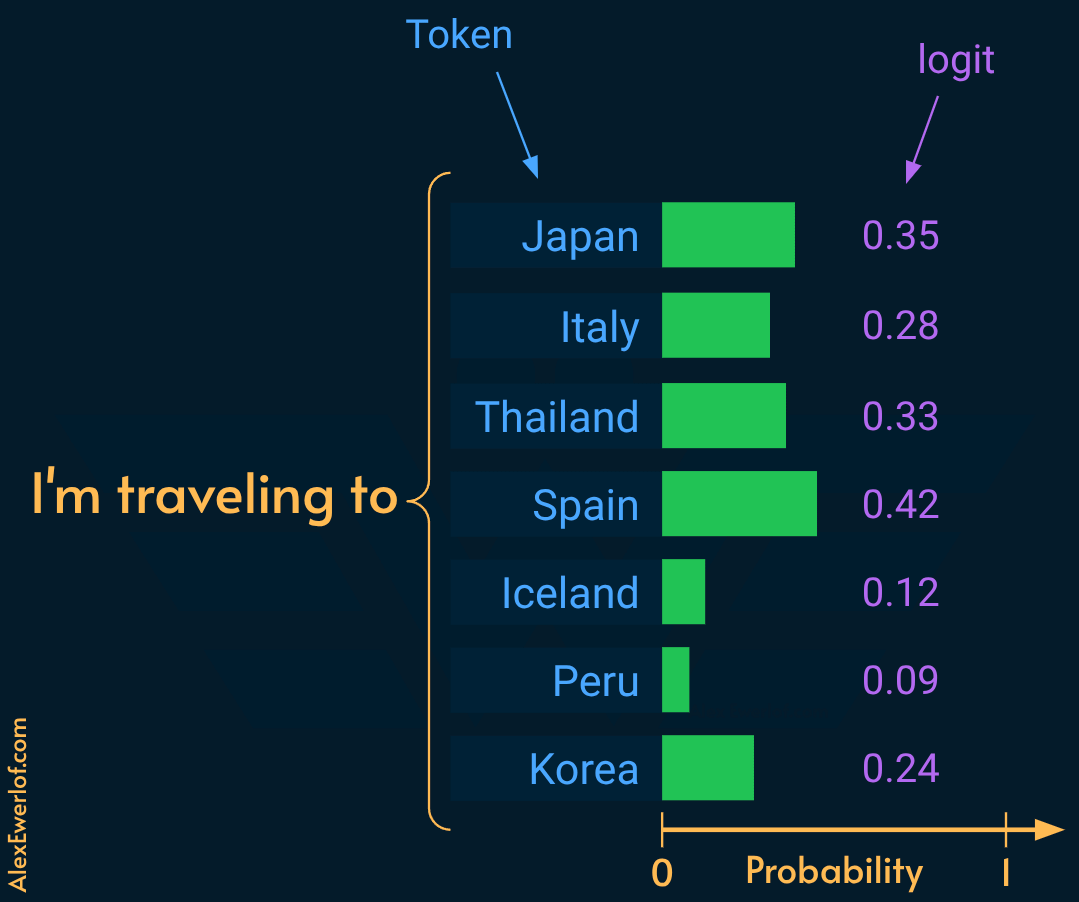
Note: A token is the actual building block of text (a word or sub-word piece) the AI uses, whereas a logit is a raw, unnormalized numerical score that the model assigns to a given token in its vocabulary to determine which one comes next.
2. Basic Probability Shaping
These arguments modify the raw probability distribution of the next token before it is sampled. They define the vocabulary pool the model is allowed to draw from.
2.1 Temperature
CLI parameter:
--temperature NRequest parameter:
temperature(ref)Range:
0.0(greedy) to2.0+(creative). Note: although technically it’s possible to go above 2.0, it hurts the quality and usually leads to nonsensical output.Default:
0.80(llama-server’s default)
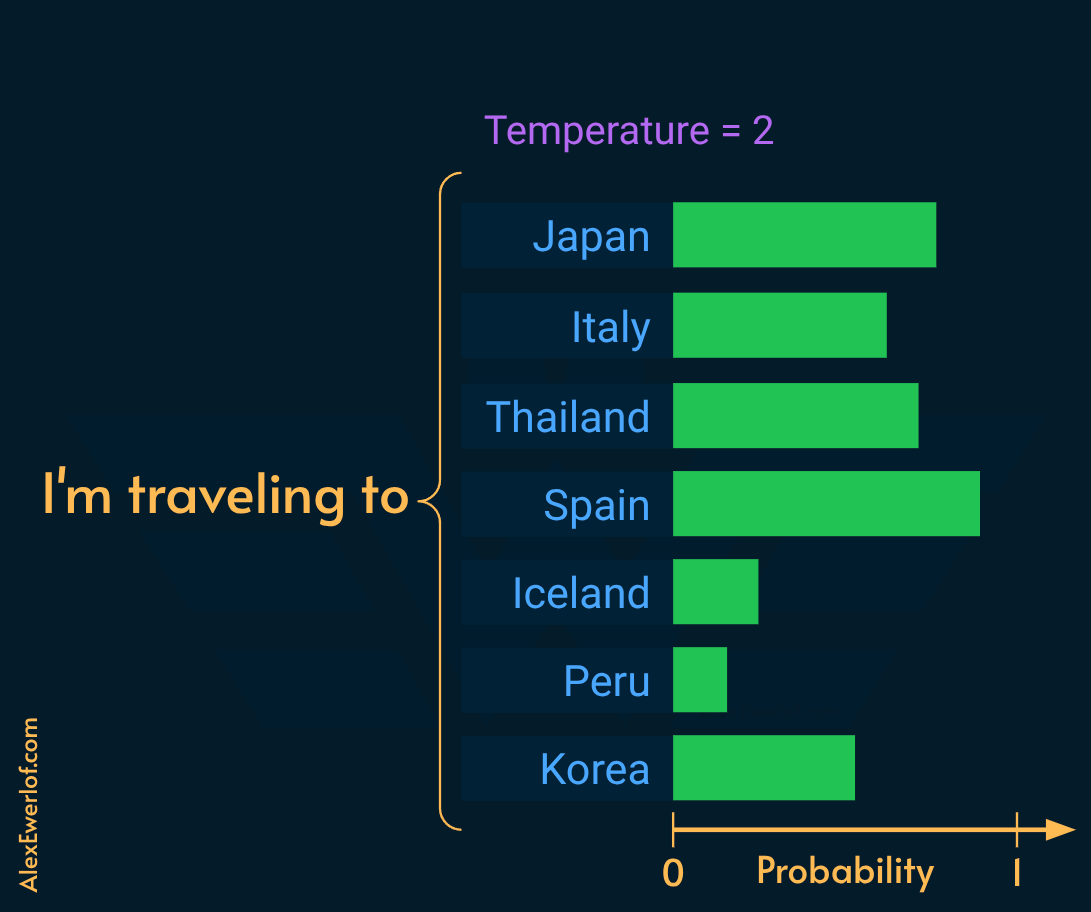
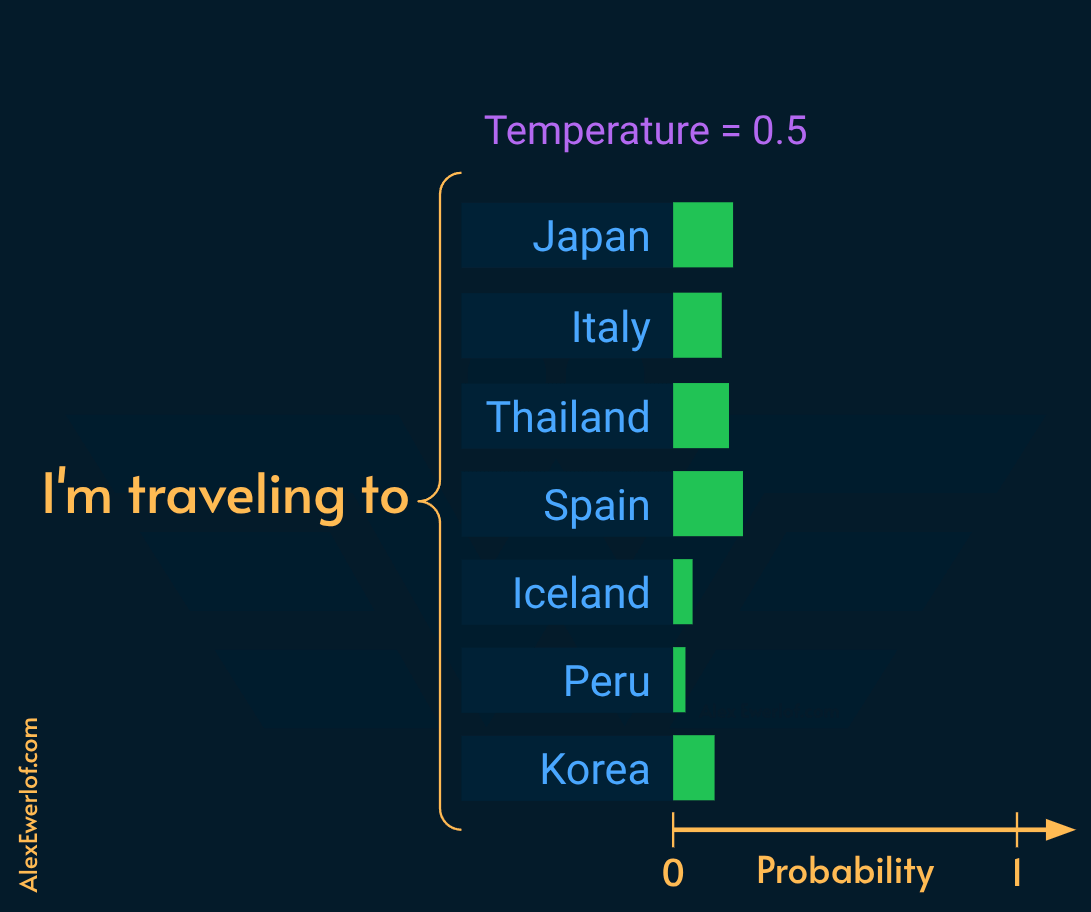
Divides the raw logits by (N) before applying the softmax* function.
N < 1.0: sharpens the distribution (deterministic/greedy).
N > 1.0: flattens the distribution (increases variance).
Note: * Softmax function converts raw, unnormalized prediction scores (logits) into a proper probability distribution. It guarantees all token probabilities fall between 0 and 1 and sum up to exactly 1.
Setting temperature:
RAG/Coding/Fact-checking:
0.0to0.3(Prioritize strict syntax and grounded facts).Review/Judge:
0.4to0.7(Needs coherence but flexibility in reasoning).Creative Writing:
0.8to1.2+(Requires strict bounds like Min-P to prevent gibberish at higher values).
2.2 Top-P
CLI parameter:
--top-p NRequest parameter:
top_p(ref)Range:
0.0to1.0(disabled).Default:
0.95
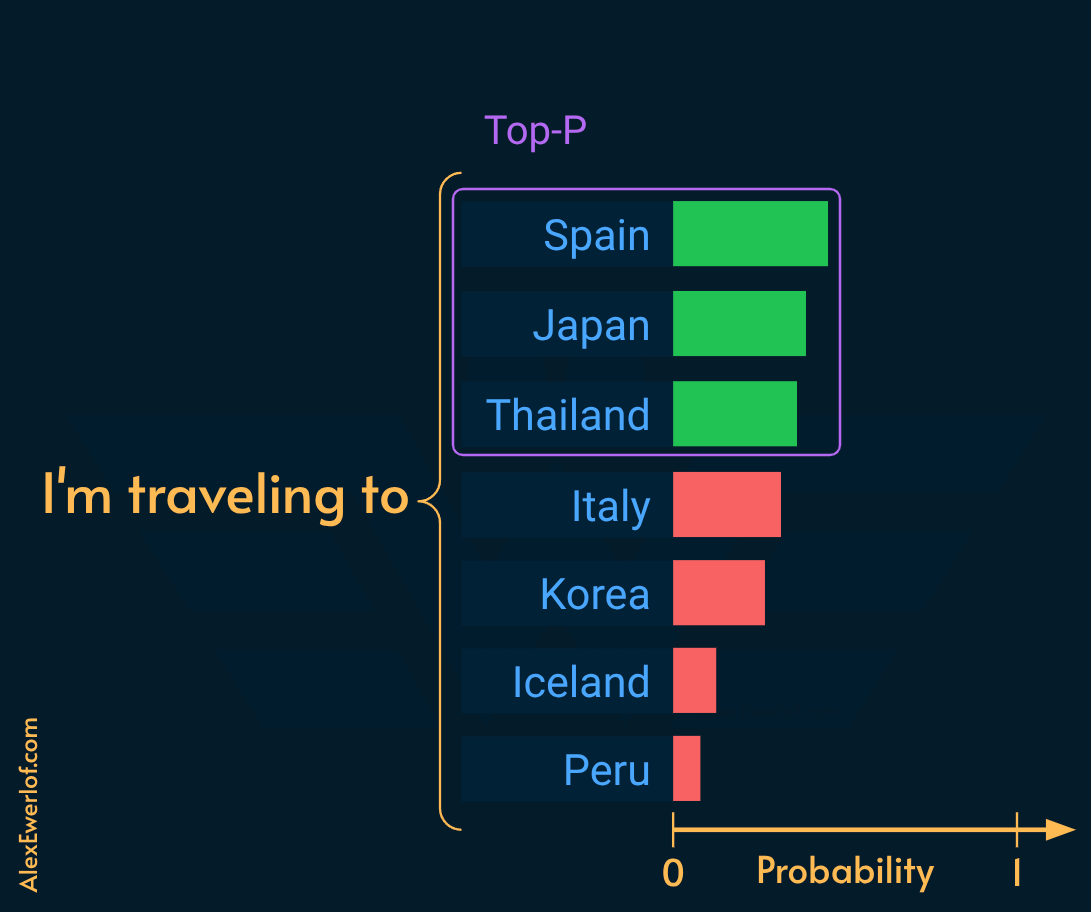
Top-P (also known as Nucleus Sampling) sorts tokens by probability, then retains the top tokens whose sum equals N. This creates dynamic truncation. If the model is highly confident, the token pool is small. If uncertain, the pool is wide.
TopP of 0 is essentially the greedy sampling which selects the highest probability token.
TopP of 1 is essentially like random sampling.
Setting Top-P:
Creative writing:
0.80-0.95Coding/RAG:
0.1to0.5
2.3 Min-P
CLI parameter:
--min-p NRequest parameter:
min_p(I could not find a reference to that in OpenAI API but OpenRouter has it).Values:
0.0(disabled) to1.0Default:
0.05.
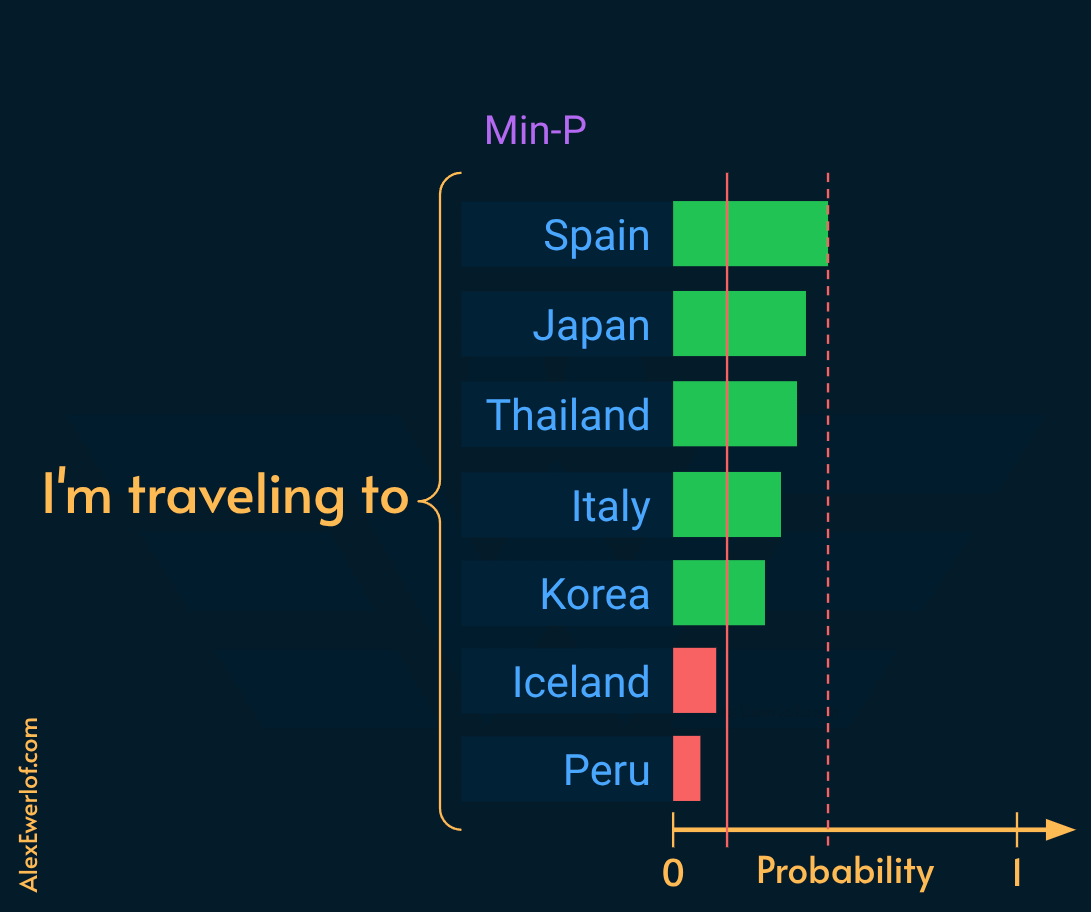
Truncates any token whose probability is less than N times the probability of the most likely token.
For example, if the most likely token has a probability of 0.93, a Min-P of 0.05 removes any token which has a probability less than 0.05 x 0.93 = 0.0465
Min-P is highly effective for smaller or heavily quantized models. It dynamically scales the truncation threshold based on the model’s confidence, preventing “garbage” tokens without the hard cumulative limit of Top-P.
Setting Min-P:
0.05to0.1across almost all use cases (the default value of0.5is pretty good in my experience).It allows for a high temperature (
1.5+) in creative writing while maintaining perfect grammatical coherence.
2.4 Top-K
CLI parameter:
--top-k NRequest parameter:
top_kValues:
0(disabled) all the way to the size of the vocabulary!Default:
40.
Top-K sorts tokens by probability and discards all but the top N tokens. This is more rigid than Top-P which dynamically chooses the top possibilities to reach a specific sum.
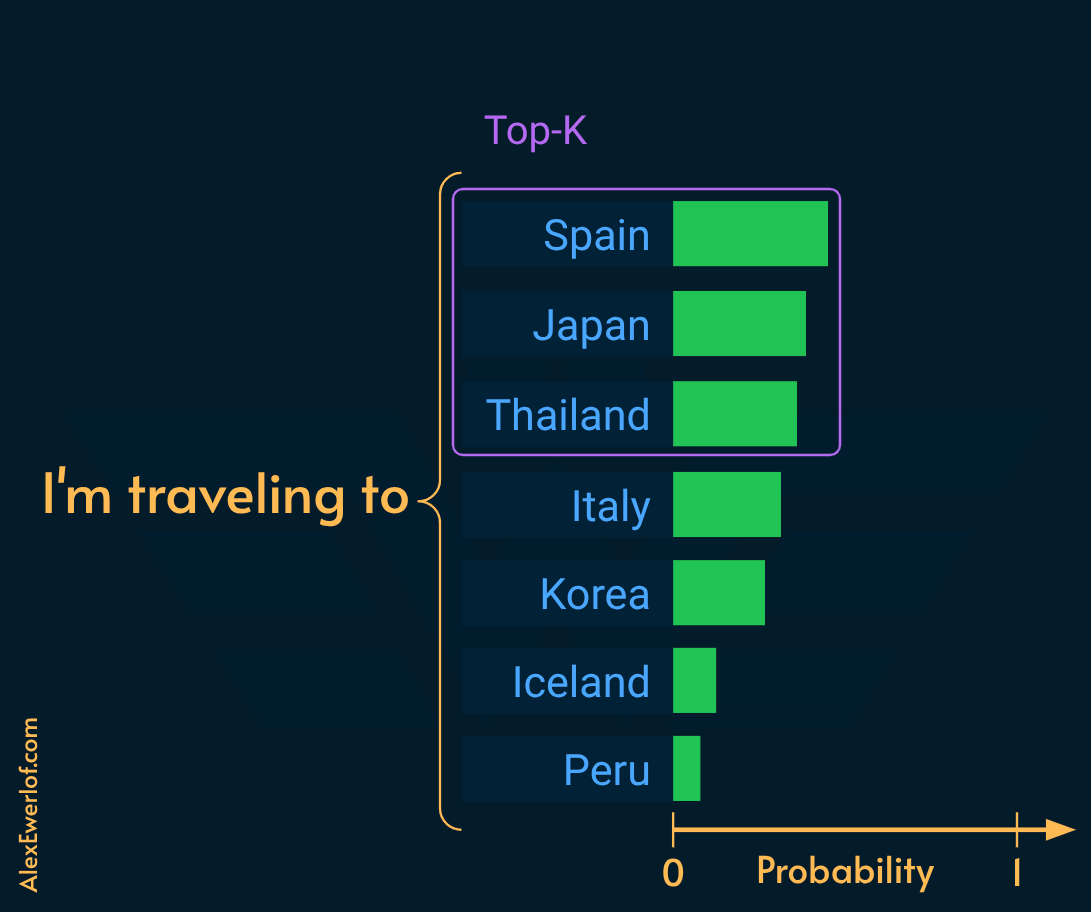
⚠️ Top-K is largely considered legacy. Use Top-P and Min-P instead. If enabled, keep it relatively high (40 - 100) to avoid artificially constraining the model into loops.
3. Traditional Token-Level Penalties
These parameters apply mathematical reductions to a token’s logit based on its prior appearance in the context window. They are blunt instruments that can degrade grammar if overused.
3.1 Penalty window
CLI parameter:
--repeat-last-n NRequest parameter:
repeat_last_n(Some clients map this asn_keep)Values:
0(disabled),-1(entire context), or positive integer.Default:
64.
This parameter defines the look-back window (in tokens) for all token-level penalties.
Usage:
Short structured outputs: use
-1to look at the entire context.Long-form creative writing: use
256to1024so the model can eventually reuse vocabulary.
3.2 Presence penalty
CLI parameter:
--presence-penalty NRequest parameter:
presence_penalty(ref)Values:
-2.0 to 2.0Default:
0.00(disabled).
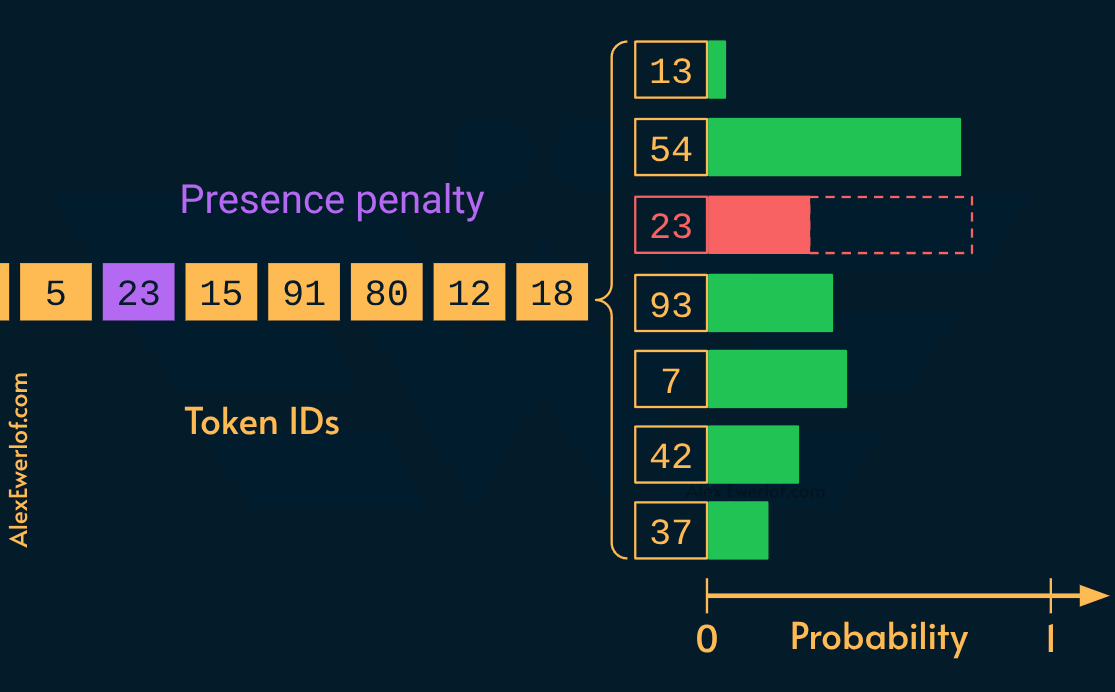
This parameter encourages the introduction of new topics/vocabulary without punishing a word heavily for multiple uses. It subtracts a flat value (N) from a token’s logit if the token has appeared at least once.
N > 0 penalizes new tokens based on whether they appear in the text so far, increasing the model’s likelihood to talk about new topics.
⚠️
N < 0boost repetition which may lead to loops or padding the end of the output with repetitive characters. I cannot think of a valid example but if you do, pls let me know in the comments.
Usage: 0.1 to 0.4 for brainstorming, creative writing, or editorial work.
3.3 Frequency penalty
CLI Parameter:
--frequency-penalty NRequest parameter:
frequency_penalty(ref)Values: -
2.0-2.0Default:
0.00(disabled)
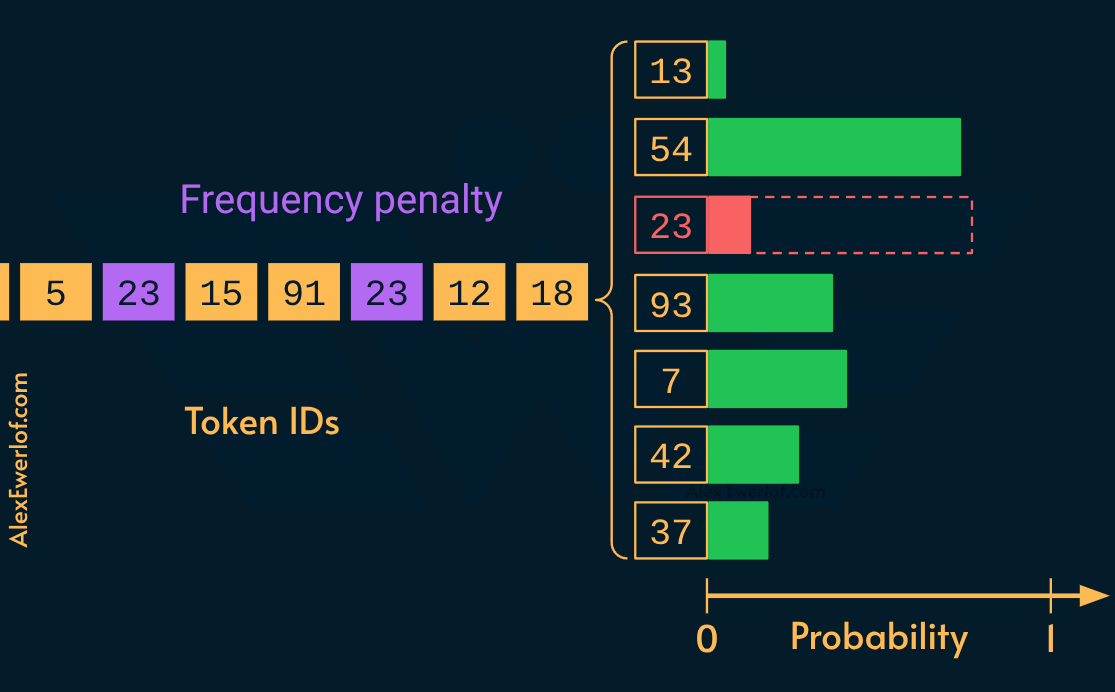
Punishes repetitive verbal tics. The more a token is used, the harder it is penalized.
N > 0 penalize new tokens based on their existing frequency in the text so far. Subtracts (
N x token_count) from the logit.⚠️
N < 0boost repetition which may lead to loops. Again, pls let me know in the comments if you can think of a use care for negative values.
Usage: 0.1 to 0.3 to gently suppress the overuse of specific adjectives or transition words.
3.4 Repeat Penalty
CLI parameter:
--repeat-penalty NRequest parameter:
repeat_penaltyValues:
1.0(disabled) to1.2+Default:
1.00.
It divides the logit of previously generated tokens by N.
⛔ It’s generally recommended to disable it in favor of DRY or Presence/Frequency penalties, because repeat penalty aggressively suppresses structural words (“the”, “a”, punctuation) and easily breaks syntax.
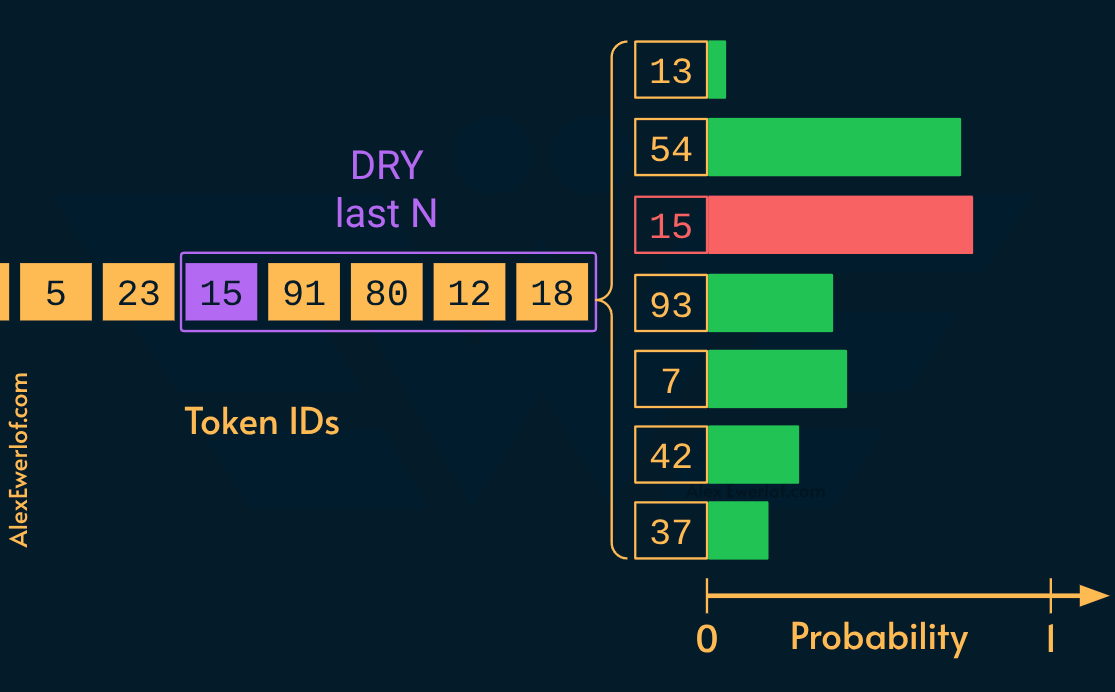
4. DRY
“Don’t Repeat Yourself” (DRY) sampling is a more modern sequence control. It evaluates sequences of tokens rather than isolated tokens. This prevents catastrophic loops (like repeating Markdown tables) without degrading single-word grammar.
4.1 DRY Multiplier
CLI parameter:
--dry-multiplier NRequest parameter:
dry_multiplierValues:
0.0(disabled) to1.0Default:
0.0
Master weight for the DRY sampling algorithm.
4.2 DRY Allowed Length
CLI parameter:
--dry-allowed-length NRequest parameter:
dry_allowed_lengthValues: Positive integer
Default:
2
The sequence length threshold before penalties apply. This allows a certain degree of repetition.
4.3 DRY Base
CLI parameter:
--dry-base NRequest parameter:
dry_baseValues: Float
> 1.0Default:
1.75
Exponential scaling factor once a sequence exceeds the allowed length.
4.4 DRY Sequence Breaker
CLI parameter:
--dry-sequence-breaker STRINGRequest parameter:
dry_sequence_breaker(Passed as a string array in JSON payload).Values: Use "none" to not use any sequence breakers
Default: \n, :, ", *
Sequence breaker defines tokens/strings that reset the DRY tracker. This is essential for structured generation. For example, you want the model to be allowed to repeat structural characters (like Markdown table pipes |), but not the text itself.
4.5 DRY Penalty last N
CLI parameter:
--dry-penalty-last-n NRequest parameter:
dry_penalty_last_nValues: 0 = disable, -1 = context size, or any integer up to the context length
Default: -1
This parameter defines the size of the look-back window (in tokens) that the DRY (Don’t Repeat Yourself) sampler analyzes to detect sequence repetitions. In practice, this is the "memory depth" for the DRY system.
Usage: Although it’s not very common to set this value, you may want to set the look-back window to be large enough to catch loops that span a few lines of output (For structured tasks like JSON or coding, for example).
DRY Usage:
Coding / JSON: Ensures the model doesn’t loop boilerplate code or output empty brackets like
}{}{}{}--dry-multiplier: 0.8--dry-allowed-length: 2.
RAG / Fact Checking: Use a moderate multiplier to stop the model from repeating injected context verbatim.
--dry-multiplier: 0.5
5. Exclude Top Choices (XTC)
XTC is an intervention-based sampler that’s helpful for sub 14B models or heavily quantized ones (e.g. Q2).
When the model is stuck in a loop, it usually assigns extremely high probability to the same few tokens.
XTC detects these high-probability “top choices” and forcibly removes them from the pool. This forces the model to sample from the second-best choices.
It ignores the model’s confidence level and instead randomly injects “chaos” into the top-tier token pool.
Unlike repeat_penalty (which might punish a word even when logically required), XTC only acts when the top-tier selection becomes repetitive, leaving underlying grammar intact.
5.1 XTC Probability
CLI parameters:
--xtc_probability NRequest parameter:
xtc_probabilityRange:
0to1(0= disabled)Default:
0.0
5.2 XTC Threshold
CLI parameters:
--xtc_threshold NRequest parameter:
xtc_thresholdRange:
0to1(1= disabled)Default:
0.10
Setting XTC:
For creative tasks, use this when the model produces “stuttering” or repetitive narrative structures:
--xtc_probability 0.5--xtc_threshold 0.1
For strict coding or math, disable XTC:
--xtc_probability 0--xtc_threshold 1
6. Dynamic Temperature
Adjusts temperature dynamically based on the logit distribution. If the model is confused (flat distribution), it lowers the temperature to focus it. If overconfident (spiky distribution/looping), it raises the temperature to add variance.
The dynamic temperature algorithm defines a strict numerical window and then uses an exponential curve to slide the actual applied temperature up and down within that window based on the model's entropy.
6.1 Dynatemp Temperature Range
CLI parameter:
--dynatemp-range NDefault:
0.0(disabled)
This parameter defines the absolute maximum and minimum limits of the temperature swing, centered around your. The final temperature will be:
From:
temperature - dynatemp_rangeTo:
temperature + dynatemp_range
Example: If you set --temperature 1.0 and --dynatemp-range 0.2, the sampler is physically hardcoded to only ever apply temperatures between 0.8 and 1.2.
6.2 Dynatemp Temperature exponent
CLI Args:
--dynatemp-exp EDefault: 1.00
While the range sets the floor and ceiling, the exponent dictates how the sampler travels between those two extremes.
C(Confidence): The algorithm calculates a normalized “confidence score” (the inverse of entropy) between0.0(totally confused) and1.0(absolutely certain).
E(your config): The exponent E is applied to this score before mapping it to the temperature window.
The underlying math conceptually looks like this:
By changing the exponent, you change the curve of the interpolation:
E = 1.0(Linear): The temperature scales proportionately with confidence. A50%confident distribution yields a temperature exactly in the middle of your range.E > 1.0(Conservative/Convex): For example, ifE = 2.0, squaring a0.5confidence score yields0.25. This heavily biases the output toward the lower end of your temperature range. The model will stay cool and focused most of the time, only spiking to the maximum temperature when it is extremely confident (which is exactly when you want to break a repetitive loop).E < 1.0(Aggressive/Concave): For example, ifE = 0.5(a square root curve), taking the square root of0.5yields~0.7. This biases the output toward the higher end of your temperature range. The model will run “hot” by default and only clamp down to the minimum temperature when it is severely confused.
Usage: This is an excellent set-and-forget alternatives to static temperature for mixed-use chat environments.
A standard robust configuration sets a relatively wide range with a high exponent (e.g., --temp 1.0, --dynatemp-range 0.4, --dynatemp-exp 2.0).
This keeps the model operating safely near 0.6 most of the time to ensure logical consistency, but allows it to spike rapidly toward 1.4 the moment it detects the near-zero entropy state that precedes a repetition loop.
7. Adaptive-p
Adaptive-P is a stateful, dynamic alternative to standard Top-P (Nucleus) sampling. While a static Top-P uses a fixed cumulative probability threshold (e.g., 0.95) for every single step, Adaptive-P continuously shifts that threshold based on how confident the model has been over the last few tokens. Instead of rigidly cutting off the token pool at a fixed percentage, Adaptive-P tracks the actual probability of the tokens the model ends up selecting. It uses an Exponential Moving Average to maintain a "running state" of the model's confidence.
The adaptive-p sampler transforms the token probability distribution to favor tokens that fall near a user-configurable probability target.
Internally, the sampler maintains an exponential moving average of the original probabilities of selected tokens. It uses this, along with the user’s set target, to compute an adapted target at each sampling step, steering the running average toward the configured target over time.
If recent selections have been higher-probability than target, the sampler compensates by temporarily favoring lower-probability tokens, and vice versa (more info on the PR #17927).
⚠️ Adaptive-p selects a token ID rather than just mutating candidates, so it must be last in the --sampler chain.
7.1 Adaptive Target
CLI parameter:
--adaptive-target NRange:
0.0to1.0 (negative value = disabled)Default: -1.00
This establishes the baseline probability mass you want to capture (similar to a standard Top-P value).
When set to a negative number, the adaptive probability transform is disabled, and instead it just samples normally.
A good starting point is 0.55. Then you can raise or lower the target in increments of 0.05 as you experiment.
During generation, if the model is outputting highly predictable text (like boilerplate code), it consistently selects tokens with high probability. Adaptive-P detects this streak and shrinks the sampling threshold, effectively behaving like a very strict Top-P or greedy sampler. This prevents low-probability garbage tokens from slipping in.
If the model then encounters a complex reasoning step and the probability distribution flattens (uncertainty), the running average drops. Adaptive-P instantly widens the threshold, allowing the model to evaluate a larger, more diverse pool of tokens until its confidence stabilizes again.
In practice, it accomplishes a similar goal to Mirostat (adapting to the model’s entropy), but it achieves it by directly manipulating the Top-P cumulative mass boundary rather than targeting cross-entropy.
7.2 Adaptive Decay Rate
CLI parameter:
--adaptive-decay NRange: 0.0 to 0.99 (Clamped to <=0.99 at init to avoid unbounded accumulation)
Default: 0.90
This is the smoothing factor. It dictates how much “momentum” the running average has.
A higher value (e.g., 0.95) means high inertia; the sampling threshold adapts slowly to changes in the model’s confidence.
A lower value (e.g., 0.50) makes the sampler highly reactive, immediately widening or narrowing the token pool if the model suddenly gets confused or highly confident.
8. Mirostat
Standard samplers like Top-P, Min-P, and Top-K are stateless functions. They apply a hardcoded mathematical filter to the logit array on every single token generation, completely blind to the context of what happened in the previous step.
Mirostat is a stateful algorithm. It maintains a running metric of the text’s “surprise” (cross-entropy) and dynamically adjusts the truncation boundary for the next token based on the mathematical outcome of the previous token.
Instead of defining a fixed probability cutoff, you define a target level of randomness. The algorithm then continuously shifts the bounds to maintain that exact level.
⚠️ Mirostat selects a token ID rather than just mutating candidates, so it must be last in the --sampler chain. Mirostat usage, disables Top-K, Top-P, and Locally Typical samplers.
8.1 Mirostat
CLI parameter:
--mirostat NValues: 0 = disabled, 1 = Mirostat, 2 = Mirostat 2.0
Default: 0
8.2 Mirostat Learning rate
CLI parameter:
--mirostat-lr NDefault: 0.1
The learning rate dictates the step size for adjusting the internal filter.
A high value means the algorithm reacts very quickly to sudden changes in the model’s confidence, but it can overshoot and cause jitter.
A low value provides a smoother, more gradual adjustment over multiple tokens.
8.3 Mirostat Target entropy
CLI parameter:
--mirostat-ent NDefault: 5.00
Usage: Useful for running highly quantized models where quantization introduces severe perplexity spikes.
This is your desired baseline of randomness.
A low value (e.g., 3.0) forces the algorithm to aggressively prune tokens to keep the text highly predictable and safe.
A high value (e.g., 5.0 or 8.0) loosens the bounds, allowing a wider variety of vocabulary and structure.
A target entropy of 5.0 keeps the output stable.
7. Honorable mentions
These are not exactly sampling controls but help mitigate some failure modes:
--seed 1234: I usually pass a seed to make different server runs a bit more reproducible. The actual value doesn’t matter as long as you’re consistent.--n-predict 2048:I usually set a cap on how many tokens are generated. That way if the model is stuck in a loop, I don’t have to wait for the entire context length. Fail fast. I usually set the initialization value to something high because it can also be set per request usingmax_completion_tokens(ref). That way, I can lower it per-request depending on what I’m expecting. One way to look at it is time: if your server emits on average20tok/sec, then a max value of2400means the server can go for120seconds (2 minutes). I think that’s reasonable if it doesn’t happen too often.--reasoning-budget 1024:sometimes the model gets stuck overthinking. By manually setting a thinking budget in tokens, I prevent that. In my experience with Gemma 4 26B, around 1024 tokens is more than enough and usually the model stops before hitting this limit. But if it gets stuck, I don’t want to sit there and wait.--json-schema-file:super useful for when the response should be a JSON and you don’t want to waste time and token by doing the schema validation outside the model (e.g. in the harness).--grammar/--grammar-file:allows enforcing rigid structural boundaries at the sampling level using BNF-like grammar to constrain generations (examples). I don’t use them because I haven’t needed them but it’s worth knowing that if you want a strict output, you can enforce it at the server level.
Conclusion
If the neural network is the “brain”, sampling acts as the hormones that control the action. Unfortunately most UIs don’t give much control over these parameters.
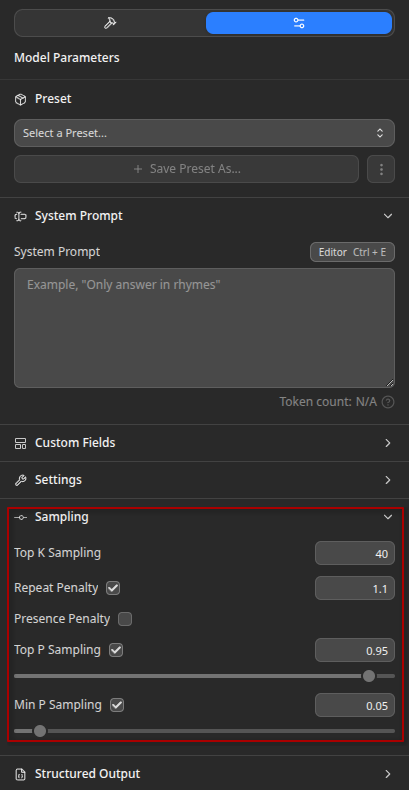
SLMs and quantized models can severely suffer from repetition and other failure modes we mentioned at the start of the article.
The default Temperature, TopP, and even MinP go only so far.
If you want to run local models professionally, you need to stay on top of sampling or at least be able to reason about it.
Llama.cpp has evolved a lot and as a result, some sampling mechanisms aren’t recommended (e.g. repeat_penalty) while some of the newer ones (e.g. XTC, Mirostat) boost the emergent behavior due to sheer complexity.

Unlike repeat_penalty (which might punish a word even when logically required), XTC only acts when the top-tier selection becomes repetitive, leaving underlying grammar intact.
A given model, quantization and workload requires some trial and error to find the right sampling algorithms and parameters. In this article we mentioned some of those tips & tricks to shortcut your iterations.
References
llama-server Sampling parameters
What is temperature, TopP and TopK (YouTube)
DRY sampler PR #9702
XTC sampler PR #9742
Adaptive-P sampler PR #17927
LLM - XTC is The Secret Sauce for RPG, Creative Writing and others (YouTube)
My monetization strategy is to give away most content for free but these posts take anywhere from a few hours to a few days to draft, edit, research, illustrate, and publish. I pull these hours from my private time, vacation days and weekends. The simplest way to support this work is to like, subscribe and share it. If you really want to support me lifting our community, you can consider a paid subscription. If you want to save, you can get 20% off via this link. As a token of appreciation, subscribers get full access to the Pro-Tips sections and my online book Reliability Engineering Mindset. Your contribution also funds my open-source products like Service Level Calculator. You can also invite your friends to gain free access or save via a group subscription.
And to those of you who already support me, thank you for sponsoring this content for the others. 🙌 If you have questions or feedback, or you want me to dig deeper into something, please let me know in the comments.