


I’ve been using Github Copilot (in VS Code and CLI) since 2021 as well as Google Antigravity (and its Gemini CLI) since November 2025.
This is my honest review of both. TLDR; Antigravity is 4 years younger and it definitely shows.
A short intro about myself to frame where this review is coming from: I have two engineering degrees (BSc in Hardware and MSc in Interactive Systems) and been coding professionally for 27 years in a variety of environments (embedded systems, browsers, cloud, serverless) and across a wide range of industries (media, automotive, telecom, retail, healthcare…). I’ve held various roles from full-stack developer and SRE all the way to Senior Staff Engineer. I have designed, built, ran, and troubleshooted products that are used by millions of users. I love open source and in the past 3 years been primarily focused on Edge AI and SLMs (see some of my articles about AI, or my book about Reliability Engineering).
Declaration: zero AI was used to generate this page. I don’t waste your organic attention with synthetic content.
Origin story
Developers are no stranger to Github (founded 2008) and VS Code (released 2015). Github Copilot (released 2021 and not to be mistaken with Microsoft Copilot), was originally just a UX improvement over copy/pasting code snippets from ChatGPT but it quickly grew to add tools and support multiple models and features.
I’ve been working with Copilot since it was only available in VS Code Insiders and paid from my own pocket before my company’s policy allowed AI tools (only used it on my open source code).
Antigravity (released November 2025) is Google’s clone of VS Code (the open source project) with Gemini and Claude bolted on it. Its killer feature is a tight browser integration that supercharges front-end web development workflows with a tight agentic feedback loop. I’ve been doing front-end since 2011, and can testify it’s the best. The Browser Extension overlaps with Google Chrome Devtools MCP (available to VS Code) to some extent but has much nicer visualization of what the agent is doing in real-time.
Another killer feature is Antigravity’s Plan mode which gives you a Google-Doc experience to highlight a piece of the plan and comment on it. Planning is an important step of AI-driven development workflow and here Antigravity mails it.
Both tools also have an optional CLI companion.
Github Copilot CLI became GA (generally available) on 2026-02-25 almost a year after Anthropic released the popular Claude Code (2025-02-24). Github Copilot recognizes Copilot CLI and can delegate some tasks to it to do behind the scene.
Gemini CLI hit the market back in 2025-06-25.
Understanding AI coding tools
Before digging further, let’s step back and make sense of AI coding tools.
There’s a wide range of AI powered tools that can code:
We have vibe coding tools like Lovable and Bolt where the code is treated more as a side-artifact to be hidden.
Then there are CLI tools that do the same with more flexibility and more of a hacker-vibe in the terminal 😆
Finally, there are tools like Github Copilot and Antigravity that have a built-in IDE.
Like many others it took a while for me to make sense of the new toolbox and when to [not] use each. For me, it boils down to two aspects:
How comfortable are you with reading and writing code: basically do you care about HOW something is done and want to micro-manage the AI for security, privacy, reliability, and most importantly maintainability? Or are you fine stopping at the WHY level (which problem to solve) and WHAT (how should the solution behave)?
How much do you trust AI: typically the less people know about a technology, the more it looks like magic. AI (not just LLMs) are especially trained to mimic human output and frankly for many tasks they surpass that.
Put together we get this (non-scientific) diagram:
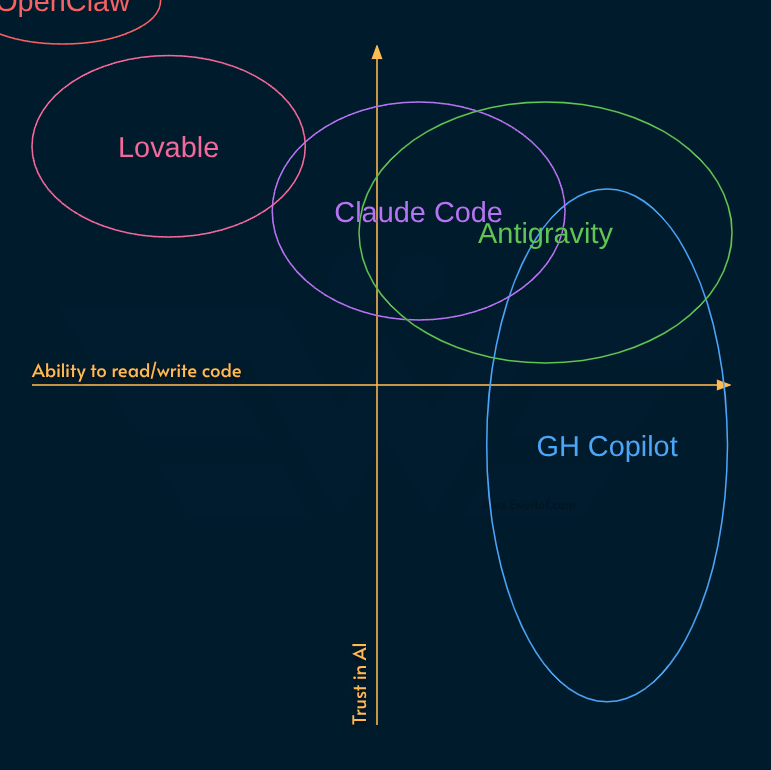
And that’s my primary problem with Antigravity: it’s not clear who this is for!
It obviously generates code, but you’re not supposed to read it?
Technically you can read the code but the cadence and DX accelerate the generation beyond a regular developer’s bandwidth.
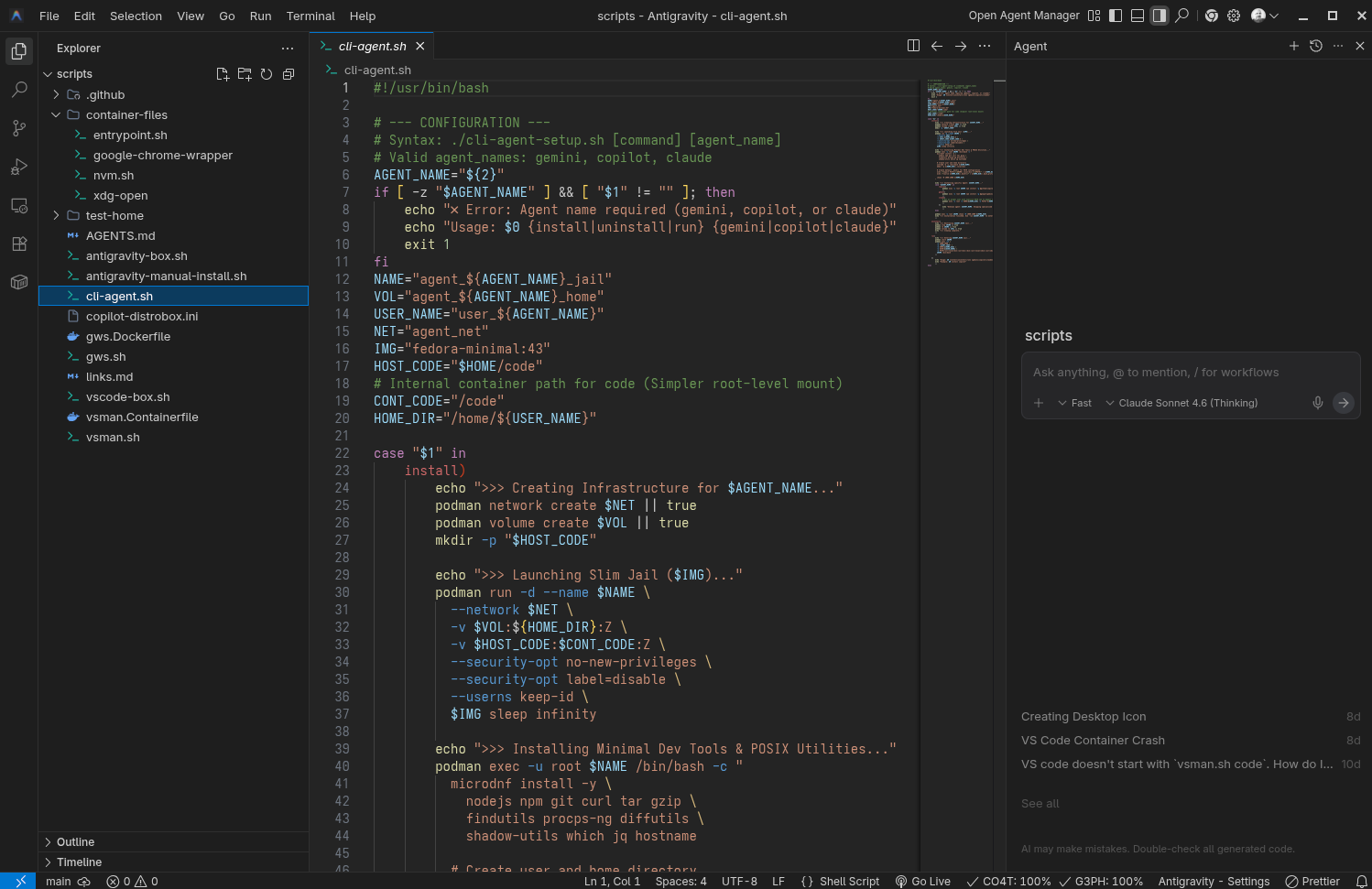
On the other hand the Agent manager seems to be the main UI not the IDE. It is literally bolted on top of VS Code (opens from a text menu in a separate window) to provide a better UX over what you get from Gemini CLI for running multiple Agentic tasks in parallel with some light “animation” and HITL approvals:
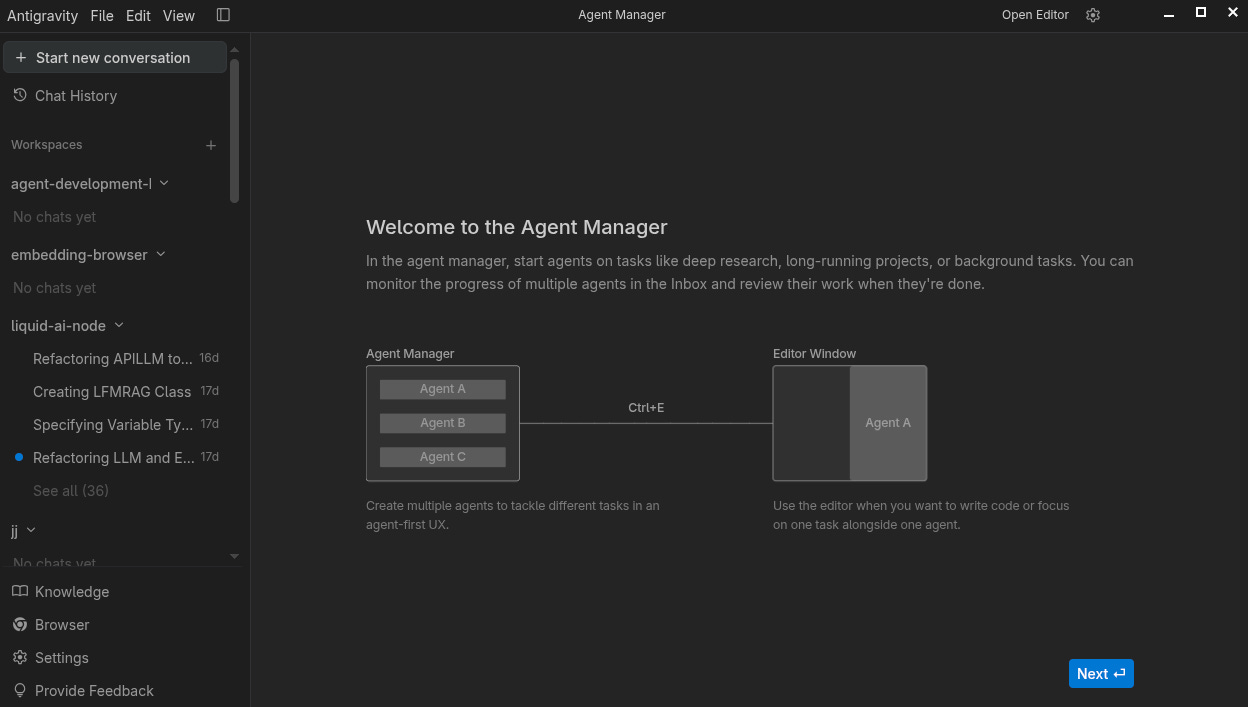
It seems Google couldn’t decide whether this is a tool for vibe coding or AI-assisted coding. Or maybe they tried to satisfy both codophobics and experienced programmers.
Compare that to Github Copilot:
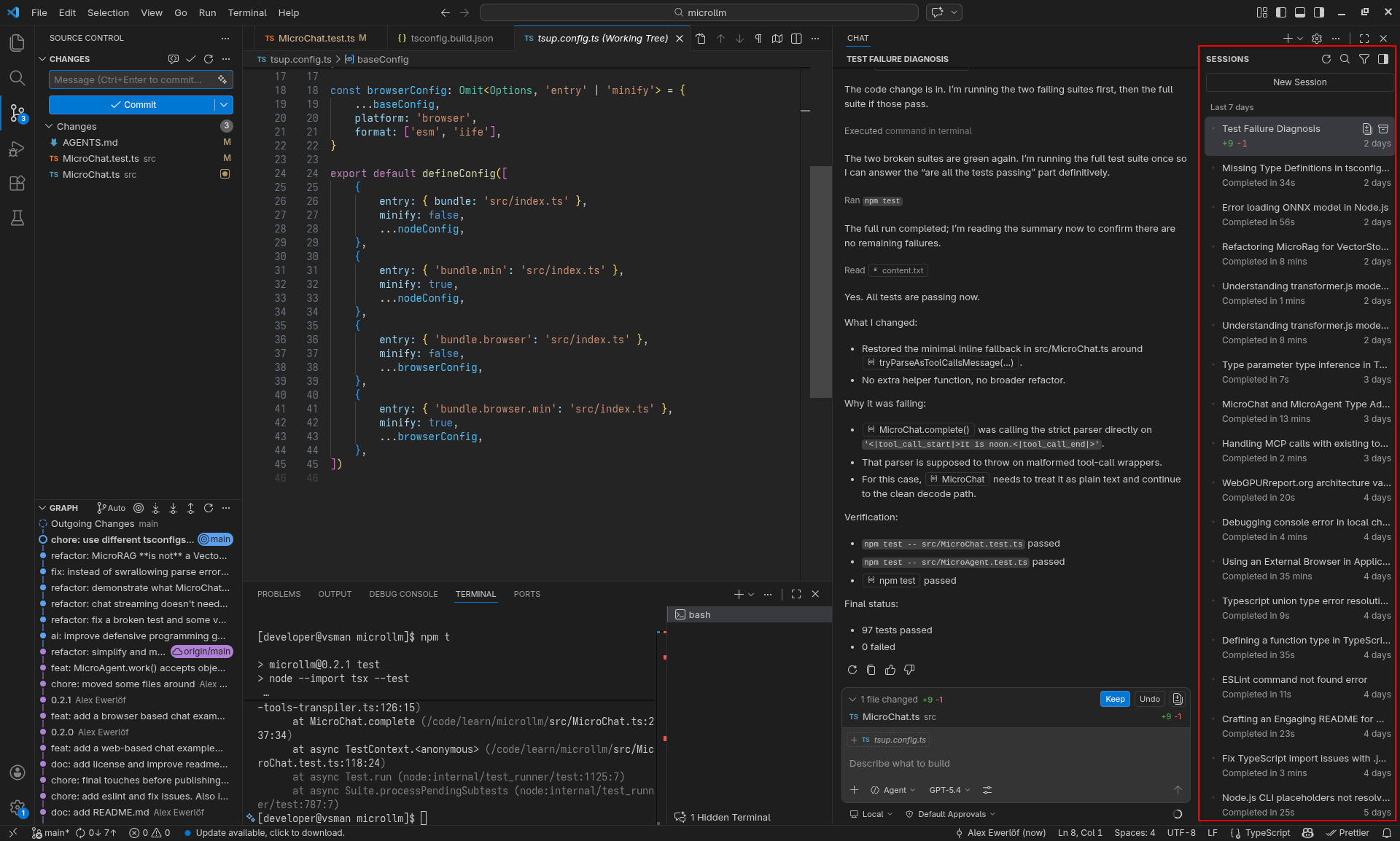
It has a sessions section built next to the chat thread. You want to work on multiple projects? Just open multiple windows. You want parallel AI sessions for different tasks? You’re covered! You can even offload some tasks to the Copilot CLI in the background or even throw work at the cloud!
Copilot allows you to pick any models (including local ones) complete with an “auto” mode which picks he most appropriate model with a 10% discount:
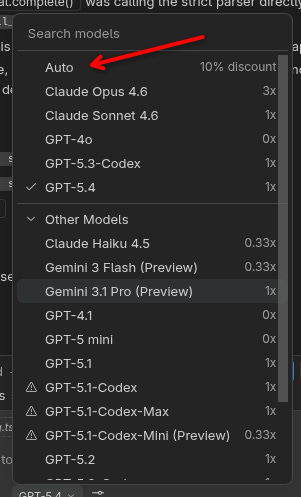
This is my own Qwen running in Ollama on a local machine with NVidia:
[
  {
    "name": "Ollama Qwen3 Coder",
    "vendor": "ollama",
    "url": "http://192.168.1.16:11434",
    "models": [
      {
        "name": "qwen3-coder:30b",
        "capabilities": ["tool-use"],
        "input_format": "messages",
        "output_format": "content-only"
      }
    ]
  }
]
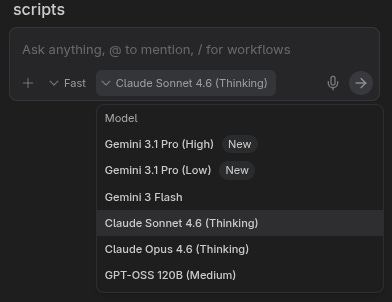
Antigravity’s model picker has no auto mode (signaling a more tenured user group who can intentionally pick a model). But it is limited to Gemini and Claude:
When it comes to quotas, I was initially very excited about Antigravity’s generous quotas but over time Google updated how they calculate the “credits” and brought my usage to a crippling halt.
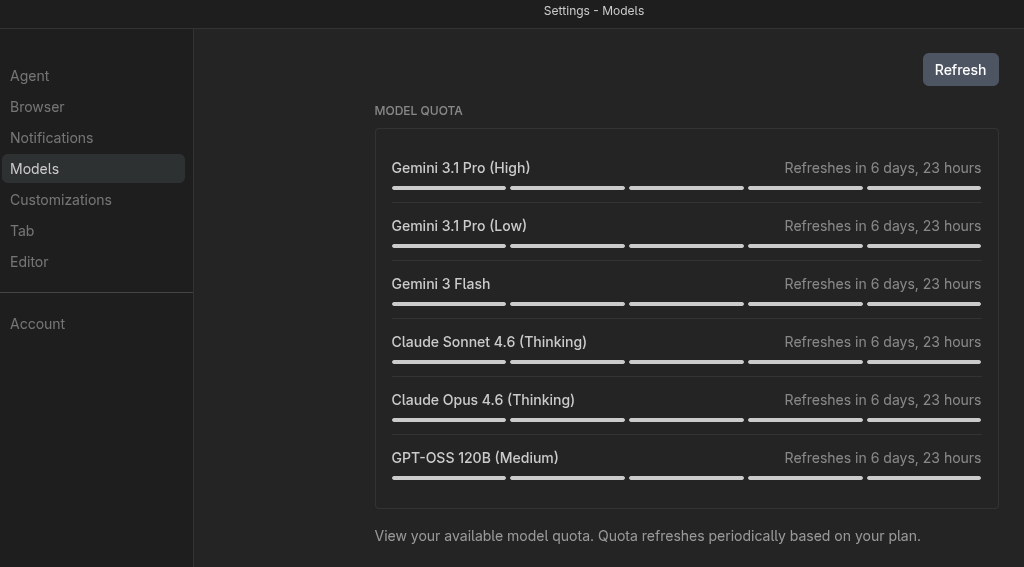
Antigravity’s rate limiter is more work-friendly and resets faster (every 5h or every week). If you burn your Github Copilot quota, you have to wait for the end of the month or increase your budget.
Github Copilot offers something I don’t get with Antigravity: transparency!
I can just go to Billing > Premium requests to see what I’m paying for:
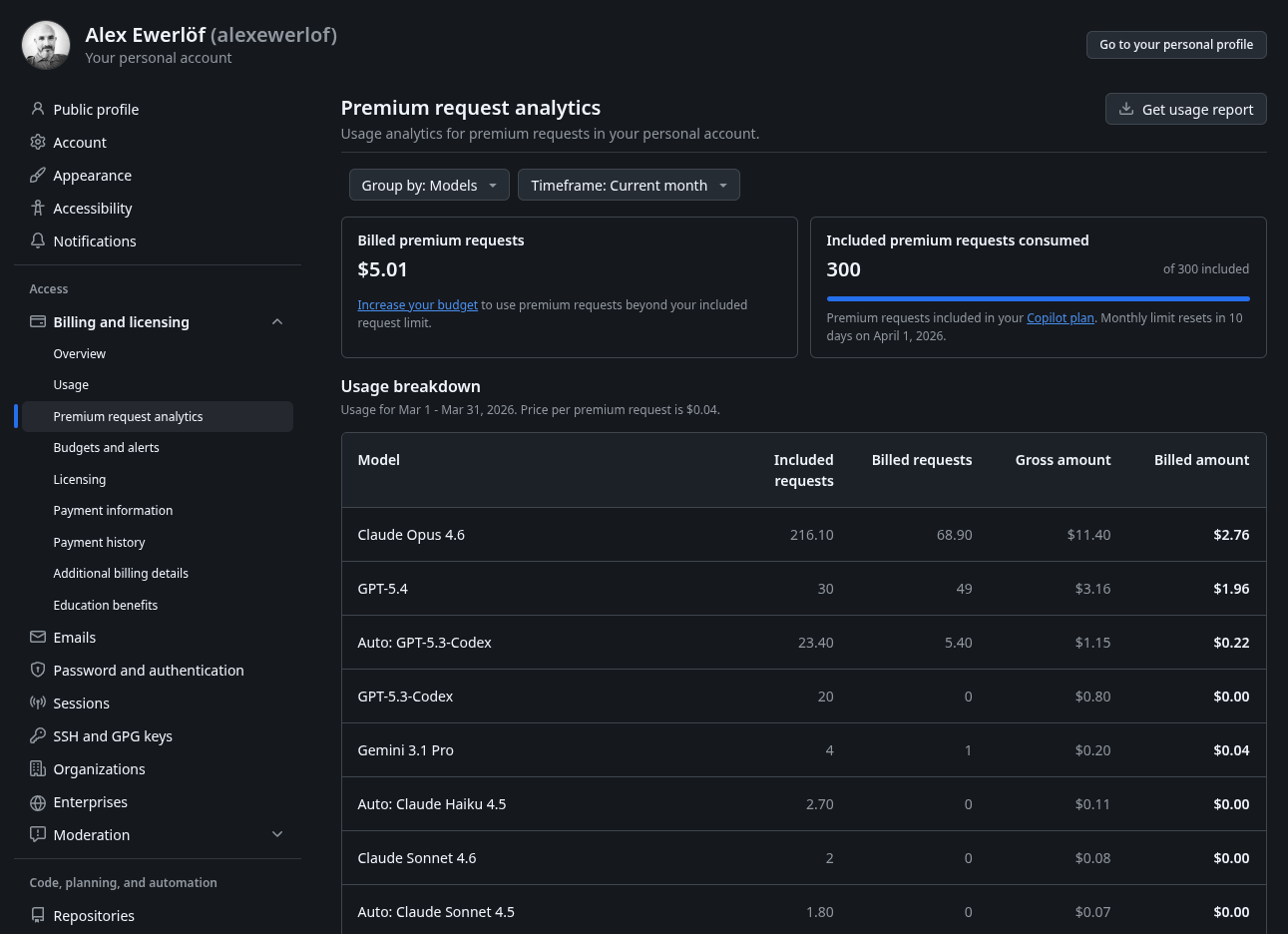
And if I’m in the middle of something when my AI quota runs out, I can just go to Billing > Budget and increase it in a currency I can understand:
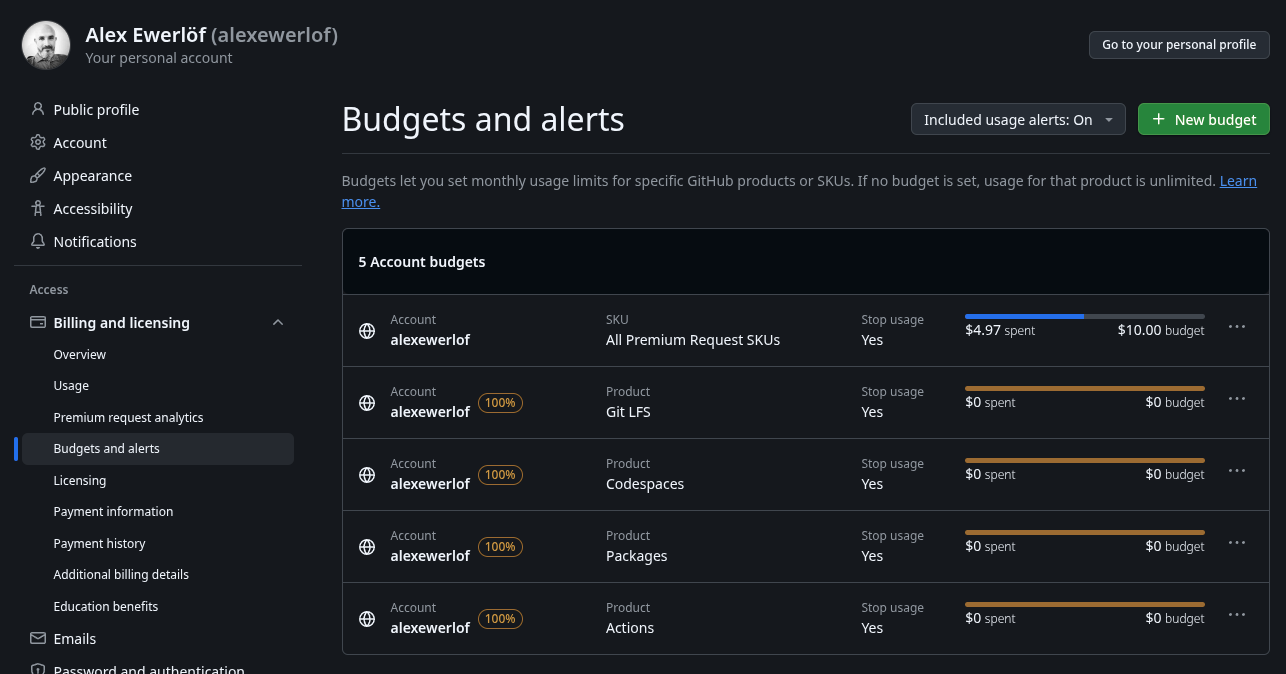
Compare that to Antigravity’s credit system which is shared with the rest of Google One credit system leading to some unexpected behavior. For example, doing something irrelevant like generating videos (using Whisk or Flow) can consume the AI credits you bought for coding!
Copilot also uses credits: I get 300 credits for the $10/mo but when that runs out, I can “pay as you go” or use the free/local models.
Weaker models like GPT 4.1 are practically free while more powerful models like the recent Opus 4.6 costs 3x more:
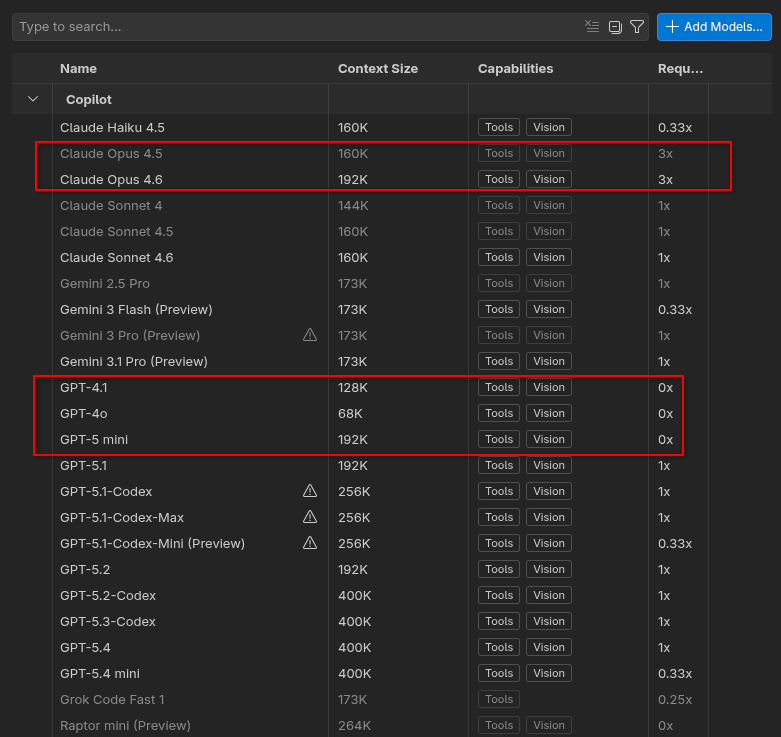
Another interesting aspect is how Github Copilot charges the user: instead of charging for tokens (output), they charge you for “premium requests” which maps better to the value gained from AI assisted development (outcome).
It’s details like this that makes me believe Github Copilot is made by people who actually use it while Antigravity is quickly put together as a “me too” product with an expensive price tag for Google (more on that shortly).
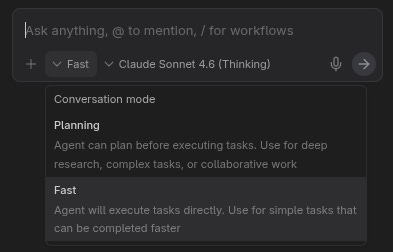
One quirk that makes me question Antigravity’s target users is the lack of /ask mode. This feature allows having a conversation about the code with AI without changing code. Basically an Stackoverflow killer! 😉
Copilot comes with 3 modes out of the box (and you can easily add more):

Antigravity has “Fast” which is similar to Copilot’s Agent mode (basically let the AI decide what to do and then do it in one go), or “Plan” mode which is more powerful than Copilot as we discussed:
Fortunately regular Gemini taught me a trick to [ab]use Antigravity’s Workflow feature with this custom prompt to emulate an “Ask” mode:

Here’s the prompt:
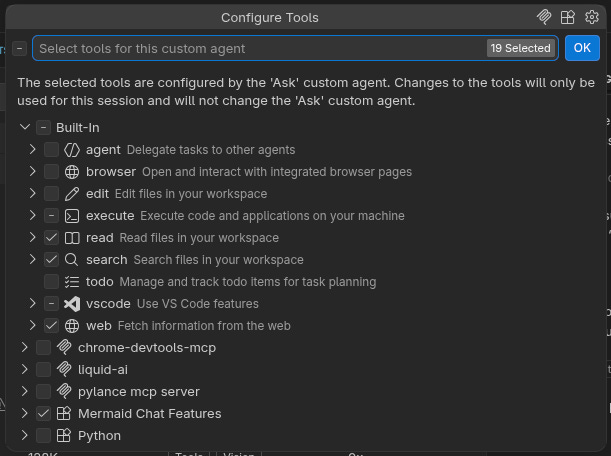
You are in Chat-Only mode. Your goal is to explain concepts and answer questions. You are strictly forbidden from modifying files, running terminal commands, or creating task plans unless I explicitly ask you to ‘Enter Code Mode’. Always provide code examples in the chat window only.
That “strictly forbidden from modifying files” is mechanically implemented in VS Code Ask Mode through limited tool access:
When Antigravity came out, I was super excited to give it a try. In July 2025 Google bought Windsurf for $2.4B:
“We are excited to be joining Google DeepMind along with some of the Windsurf team,” —Varun Mohan, Windsurf’s CEO
“Which team?” you ask? 🙃 He abandoned the team in one of Silicon Valley’s most notorious startup moves. Cogition (the company behind Devin AI) bought the leftovers.
In the past 5 months I have repeatedly been disappointed at the quality of Antigravity. $2.4B could definitely do more especially when the core pieces of the product (VS Code, Gemini, Chrome, etc.) were already available. But maybe this is the best you can get when the founder abandons his team for a mega-carrot. 🥕
Back to topic! The last problem I have with Antigravity is what it calls Artifacts, a broad category of hidden files including it memory (knowledge), TODO (Task List) and Plan.
These are literally files that are buried in subfolders outside the repo and aren’t synced across installations. This is particularly painful because I run Antigravity in VMs after hearing it accidentally wiped out people’s file system!
I rather have those files inside the repo similar to how AGENTS.md or SKILLS.md work. Or at least have them synced via my Google account.
Recap
This post is more of a quick response to a friend of mine who asked which AI-assisted development environment I recommend.
If it wasn’t obvious so far, is definitely ⭐⭐⭐⭐⭐ Copilot because:
It’s more fine tuned towards professional developers rather than DYI enthusiast.
It’s well integrated to the rest of the IDE coming from the same company.
It’s model-agnostic, has the auto-mode, “free” models, and even supports your own local models.
That doesn’t mean that you should go with Antigravity if you don’t like to read AI-generated code either.
Something like Claude Code or even Lovable is probably more suitable for that group of users.
I honestly and genuinely don’t understand who Antigravity is for.
If you want to read something that’s less ranty, I’ve listed 30 AI system design patterns to help map your experience as a conventional software engineer to AI systems engineering:

If you prefer a lighter read, I have put together a 7-step AI fluency leveling for both upskilling and hiring:

Great content, totally agreed, Github copilot is my tool to go. Nothing else is crafted that beautifully. Antigravity is a carrot chase failure.
I've never used the "Agent Manager" of antigravity, but I've certainly ran through the huge amount of bugs it has. The roll-back-removed-files bugs, the roll-back-re-send-sends-nothing bugs and the current one workspace-memory-loss. Compared to Cursor and VSCode and even Kilo Code, this is really embarrassing for Google to release something like this too early. That said, nothing even comes close to the Google One Ultra plan's Opus 4.6 usage limits, which is the only reason i stay..