


LLMs are generalists. Regardless if they’re foundation models, instruct models or thinking models, there’s a limit to what they can do in terms of specialized work.

How do we work around that limitation and turn a generalist LLM to a reliable specialist for a given set of tasks?
RAG and RLM virtually expand the context window while SKILL and MCP enable external tool access.
This post describes each technique, implementation/usage mechanics, cons/pros, and tips on when to use or avoid it.
Disclosure: some AI is used in the early research and draft stage of this this page, but I’ve gone through everything multiple times and edited heavily to ensure that it represents my own thoughts and experience.
1. RAG
Retrieval-Augmented Generation
At its core, RAG is the AI equivalent of Just-In-Time (JIT) dependency injection. LLM’s weights are static after training. What if we want to add proprietary or up to date information to it?
RAG introduces an external lookup mechanism that executes before the user prompt is submitted to the model. The goal is to dynamically append highly relevant, specialized knowledge directly into the execution context.
Implementing RAG
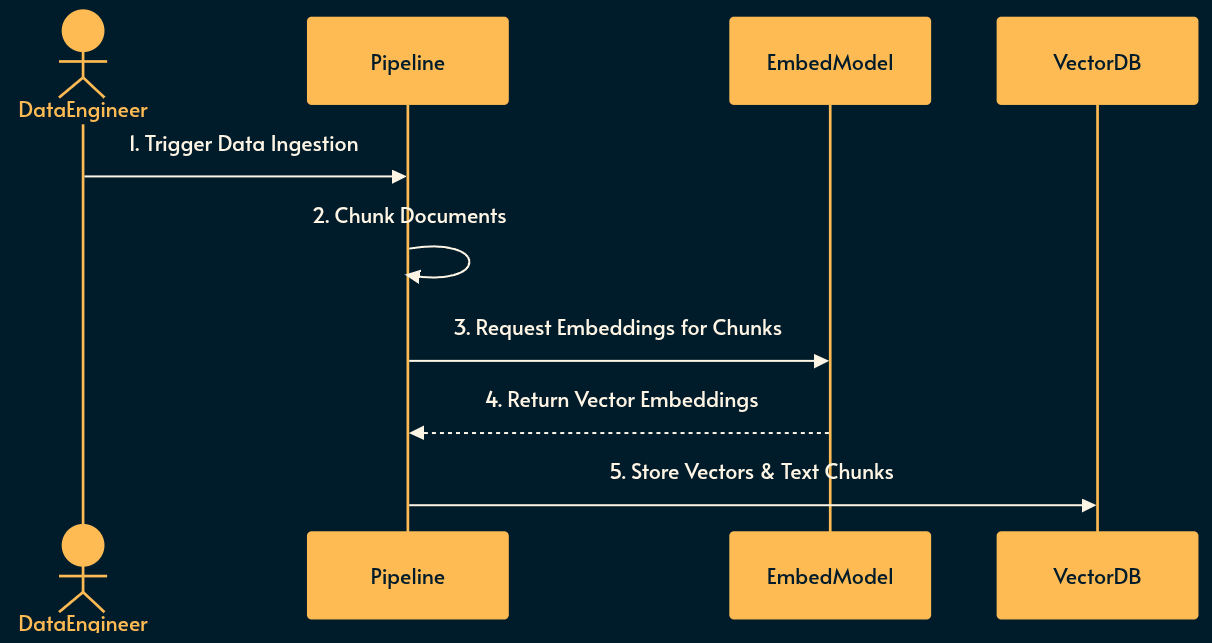
Before RAG can be used, the knowledge base must be prepared and indexed into a searchable format.
Ingestion: Raw domain data (documents, wikis, logs) is collected and parsed.
Chunking: Text is split into smaller, semantically meaningful segments to fit within embedding and context window limits.
Embedding: An embedding model converts the text chunks into high-dimensional vector representations (basically a numerical array).
Storage: The vectors and their corresponding text chunks are saved in a vector database for rapid similarity search like SQLite-Vector, Postgress pgvector, Pinecone or just a simple array that’s loaded from JSON.
Using RAG
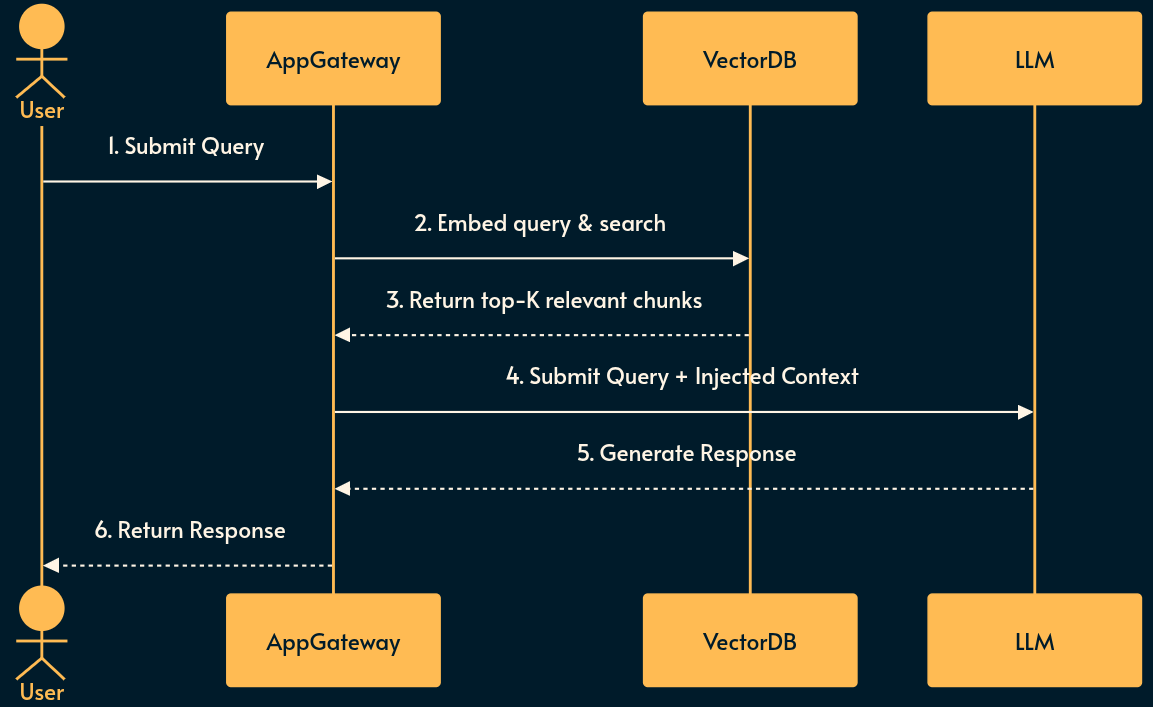
When a user interacts with the system, the pre-built vector database is queried to inject context dynamically.
Retrieval: The user’s query is intercepted and converted into a vector using the same embedding model.
Search: The system performs a similarity search (e.g., cosine similarity) in the vector database to find the most relevant chunks.
Injection: The retrieved text is prepended or appended to the user’s prompt as context.
Generation: The LLM processes the augmented prompt to generate an informed response.
Pros and Cons of RAG
Pros: Conceptually simple. Decoupled from model implementation details. Strictly bounds the LLM to provided facts (reducing hallucinations). Heavily adopted with mature tooling. Requires zero model fine-tuning. RAG data and vector DB can be updated without touching LLM.
Cons: Highly dependent on the quality of the embedding model and chunking strategy. Lexical or semantic mismatch can cause silent retrieval failures. vector DB introduces additional infrastructure overhead and state management complexities.
RAG Use case
Use RAG for when you need to query static or slowly changing knowledge bases (like corporate wikis, documentation, or historical logs) where the volume of data exceeds the LLM context window but fits well within a search paradigm.
Don’t use RAG for real-time transactional data, tasks requiring complex multi-step reasoning over the entire dataset, or when the specialized logic is behavioral rather than informational.
Note: if the size of the dataset is small, you can skip the embedding and vector DB by directly including it to the system prompt. This method is called CAG (Cache-Augmented Retrieval) but due to simplicity and limited application I didn’t include it in the list.
See also
PageIndex: a different approach to RAG which skips the embedding mechanism altogether and instead provides a table of context for the agent to navigate
GraphRAG: from Microsoft research, another approach where a knowledge graph maps the relation between different chunks of information (as opposed to the simplest form of RAG which we discussed).
2. SKILL
If RAG is like Just-In-Time dependency injection, SKILL operates like Dynamic Link Libraries (DLLs).
SKILL reverses the RAG flow: instead of a rigid vector search blindly injecting data, the LLM itself decides what capabilities it needs to acquire based on the context of the conversation.
This also eliminates the need for the embedding model and vector DB, making it much easier to use.
Implementing SKILL
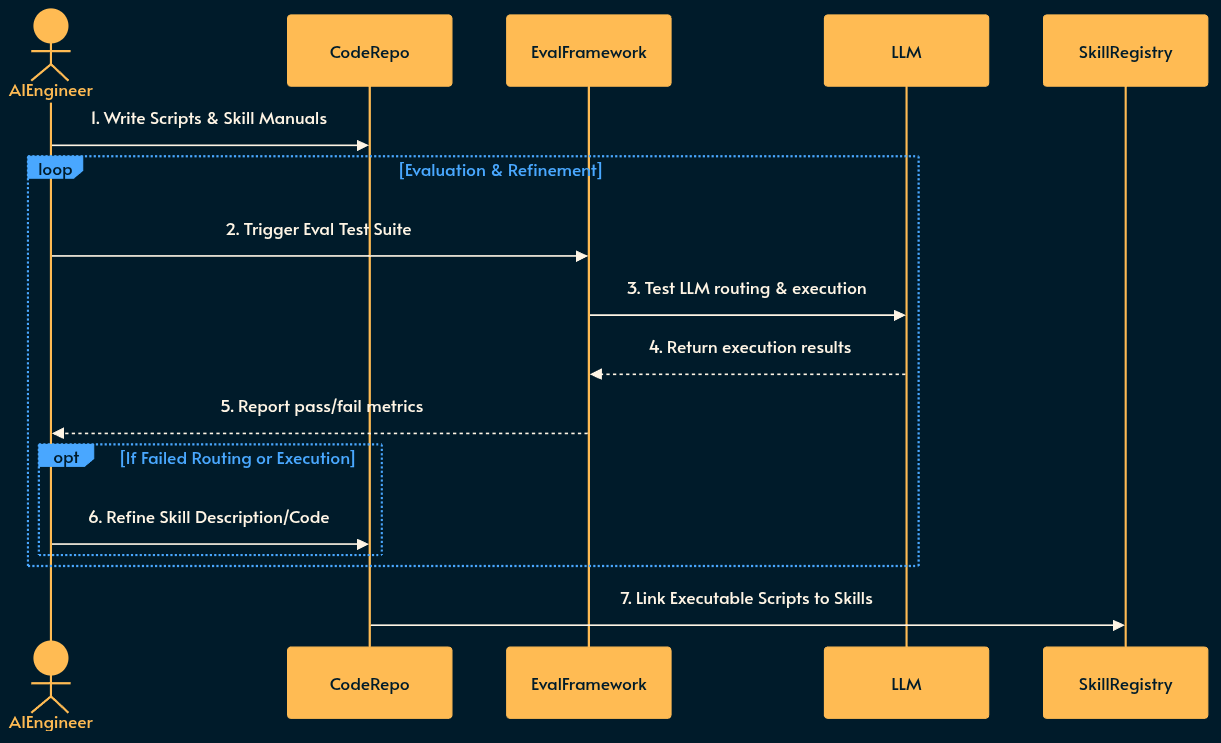
SME (subject matter experts) must first define the skills, write the deterministic code, and iteratively evaluate the LLM’s routing behavior before deployment.
Definition: Engineers write clear, concise descriptions of specific capabilities (e.g., “Financial Calculator”, “User Authentication Manager”).
Scripting: Deterministic code scripts (e.g., Node.js or Python functions) are written to handle tasks that LLMs are bad at, like math or precise string formatting.
Evaluation (Eval Loop): The skill is tested against a “golden dataset” of test queries. The evaluation framework checks if the LLM correctly routes to the new skill and if the tool returns the expected output. Failures trigger refinements to the skill description or the underlying scripts.
Registration: Once the skill passes the evaluation threshold, the skill descriptions, manuals, and executable scripts are registered in a central Skill Registry (e.g. Anthropic’s) accessible to the AI applications.
Using SKILL
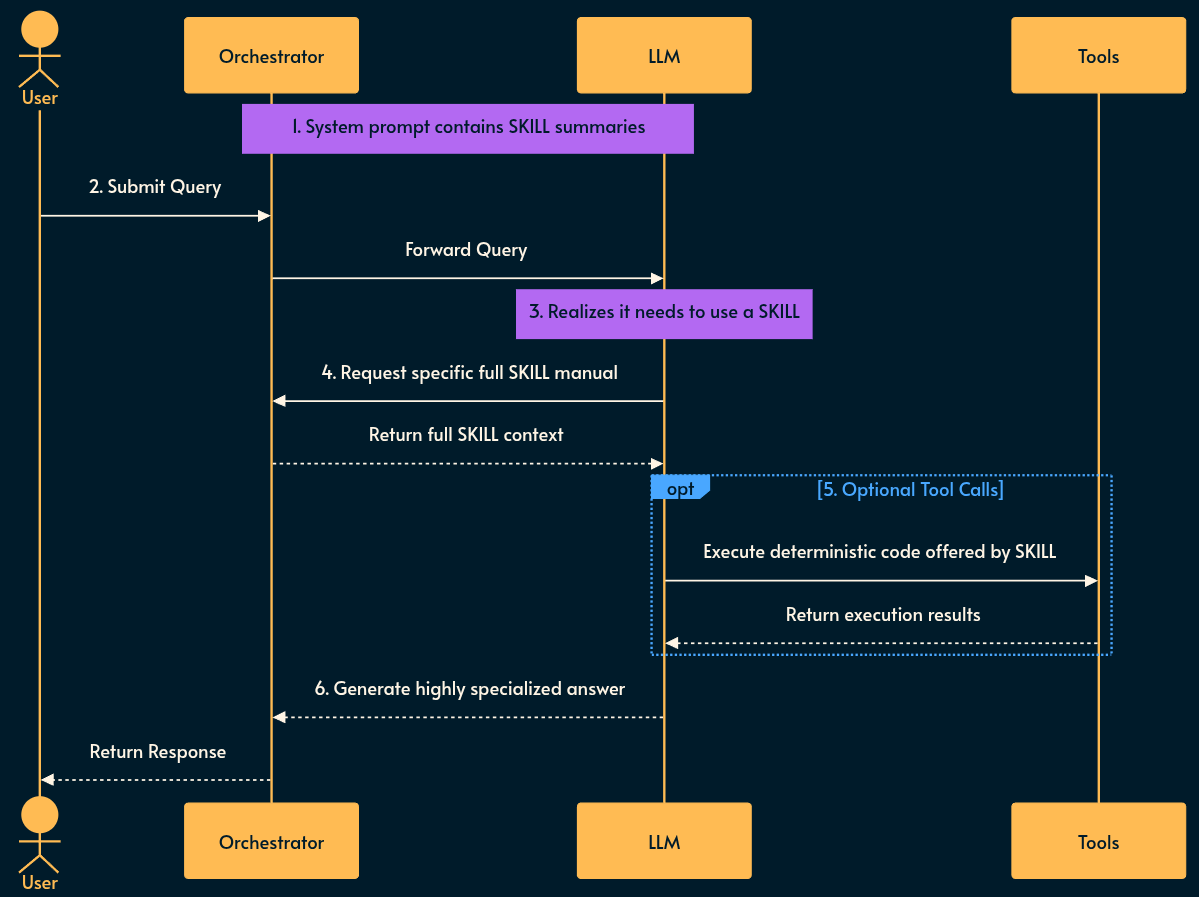
Each SKILL has has a name and description field.
Capability Broadcasting: The system prompt is injected with a lightweight list of available skill summaries (their
nameanddescription).Evaluation: The LLM evaluates the user prompt against its known capabilities.
Retrieval: If needed, the LLM requests to load the specific full skill manual or script it requires to solve the problem.
Augmentation & Tooling: The system loads the requested skill. Optionally, the LLM makes
tool callsbased on the deterministic scripts offered by the skill (the orchestrator executes those calls).Execution: The LLM uses the results of the tool execution and the newly loaded context to formulate a highly specialized answer.
Pros and Cons of SKILL
Pros: Drastically reduces token usage by only loading what is needed. Utilizes the LLM’s superior reasoning for routing rather than relying on dumb embedding model and vector similarity. Allows mixing stochastic reasoning with deterministic script execution (excellent for math or rigid logic).
Cons: Introduces multi-turn latency before the user gets an answer. Requires a highly capable reasoning model to correctly identify which skill to load.
SKILL Use case
Use SKILL for agentic workflows where the LLM has access to hundreds of potential tools, but loading all tool definitions would bloat the context window or confuse the model (the limit is around 50 tools after which LLM has difficulty loading relevant skills). It is particularly effective for offloading math or deterministic routing to simple scripts.
Don’t use SKILL for simple Q&A bots, low-latency synchronous APIs, or when using smaller, less capable models that struggle with multi-step gradual capability enhancement.
See also
npx skills: a CLI that pairs with skills.sh to find and download skills off the internet directly to your machine.
Skill specification: from Anthropic. They also have a “marketplace” for skills called Awesome Skills. Here’s another listing. And yet another one. Or this one or that one. As you can see there’s no shortage of these skill directories. 😄
3. MCP
MCP is the POSIX standard or API Gateway for AI. Originally created to standardize how LLMs interact with external software (browsers, IDEs, databases, SaaS), MCP defines a strict client-server architecture. It exposes three core primitives:
Prompts: reusable prompt templates✳️
Tools: executable functions✳️
Resources: contextual data and files
✳️ You may notice that MCP has prompt and tools in common with SKILLS. Although MCP was originally introduced as a translation layer, many MCPs are self-contained, composed of a prompt and tool. For those cases it’s better to use SKILLs.
Implementing MCP
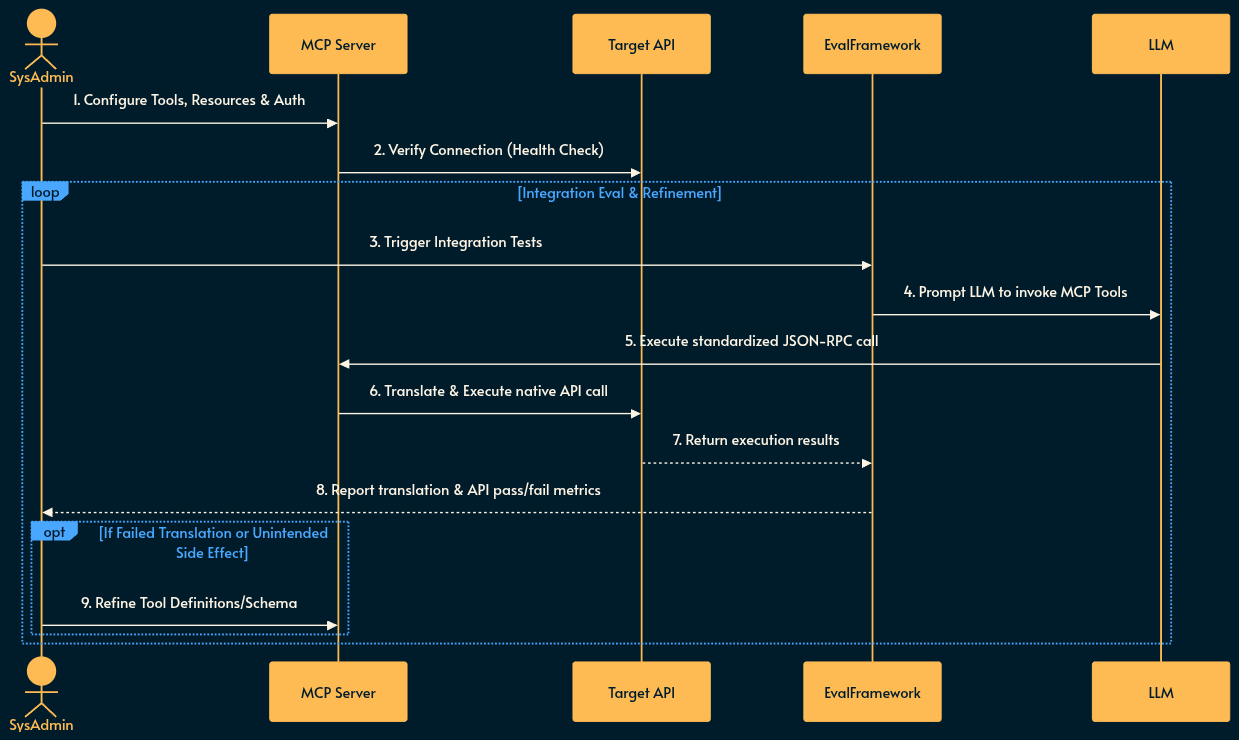
The MCP server acts as an integration layer that must be configured to talk to external systems and rigorously tested for translation accuracy.
Server Setup: An MCP server instance is provisioned on the network or locally. This can be as simple as a docker container or even an npx command.
Configuration: Engineers define the Resources (e.g., file paths, database schemas) and Tools (e.g., API POST requests) the server will expose.
Authentication & Routing: The server is configured with the necessary credentials and network routes to securely communicate with the target external systems. MCP server acts as an OAuth 2.1 resource server and MCP client acts as an OAuth 2.1 client.
Integration Evaluation (Eval Loop): Automated test suites prompt an LLM to interact with the newly configured MCP server. The Eval framework validates that the LLM correctly discovers tools, forms valid JSON-RPC requests, and that the target API responds accurately without unintended state changes.
Using MCP
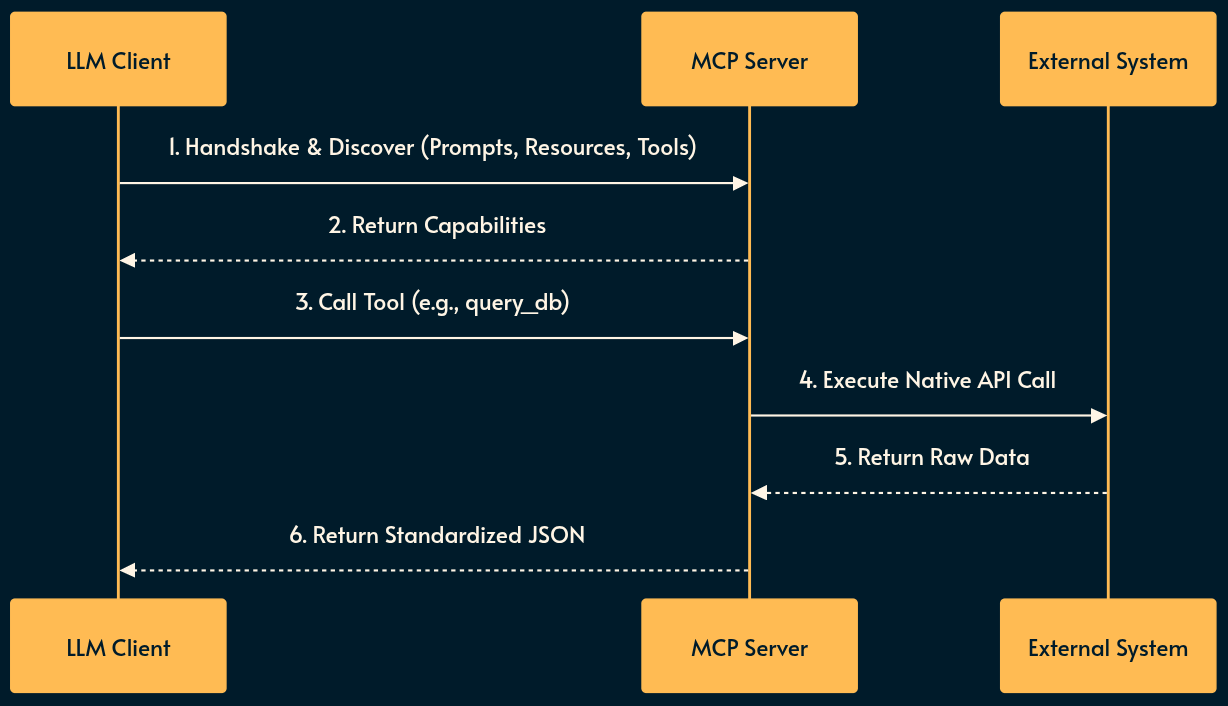
The LLM client establishes a standardized connection to interact with the environment.
Discovery: The LLM client (not the raw LLM) connects to the MCP server and queries its available Prompts, Resources, and Tools via standardized JSON-RPC.
Integration: The LLM reads a Resource (e.g., pulling a GitHub issue) or invokes a Tool (e.g., triggering a build pipeline). The LLM client makes the call.
Translation: The MCP server translates the standardized LLM JSON-RPC request into the proprietary API calls of the target software.
Callback: The external software executes the action and returns the result through the MCP server back to the LLM Client which will be handed to the LLM.
Pros and Cons of MCP
Pros: Decouples the LLM from the target API. Allows write-once, use-anywhere tool creation (an MCP server works with Claude, local tools, or custom interfaces alike).
Cons: Architecture can be heavy and rigid. As noted, self-contained MCPs often bundle too much context upfront, making them less efficient than the dynamic loading of SKILLs. LLM Client and Server (which sit between the LLM and an API) add to the system complexity. More complexity generally means more risk for things going wrong and less reliability.
MCP Use case
Use MCP for connecting LLMs to complex, stateful external systems (databases, SaaS platforms, local filesystems) where standardization, security, and reusability across different AI clients are a hard requirement.
Don’t use MCP for internal, tightly-coupled micro-agent interactions or self-contained tasks where the dynamic, lightweight nature of SKILL is more performant and cost-effective.
See also
WebMCP proposes two new APIs that allow browser agents to take action on behalf of the user:
Declarative API: Perform standard actions that can be defined directly in HTML forms.
Imperative API: Perform complex, more dynamic interactions that require JavaScript execution.
Chrome DevTools MCP) is one of my favorites because it gives the agent “eyes” to see the result of its code and debug front-end code.
Just like skills, there’s no shortage of MCP marketplaces and directories like this one, that one or this other one.
Using CLI instead of the standard JSON: I just saw this on the day of publication (which shows how rapidly this space is evolving) and the core idea is to give CLI access to LLMs instead of the MCP standard.
Skills vs Dynamic MCP Loadouts: good write up on why self-contained MCP is an anti-pattern and we should use Skills instead.
4. RLM
If SKILL operates like DLLs, RLM is like FFI (foreign function interface).
RLM is the newest architectural evolution, functioning similarly to MapReduce combined with a recursive REPL (Read-Eval-Print Loop) like the one you find in Python or Node.js.
Its primary goal is to entirely bypass the physical constraints of the LLM context window. Instead of trying to stuff a massive prompt into the model, RLM treats the long prompt as an external environment variable.
Implementing RLM
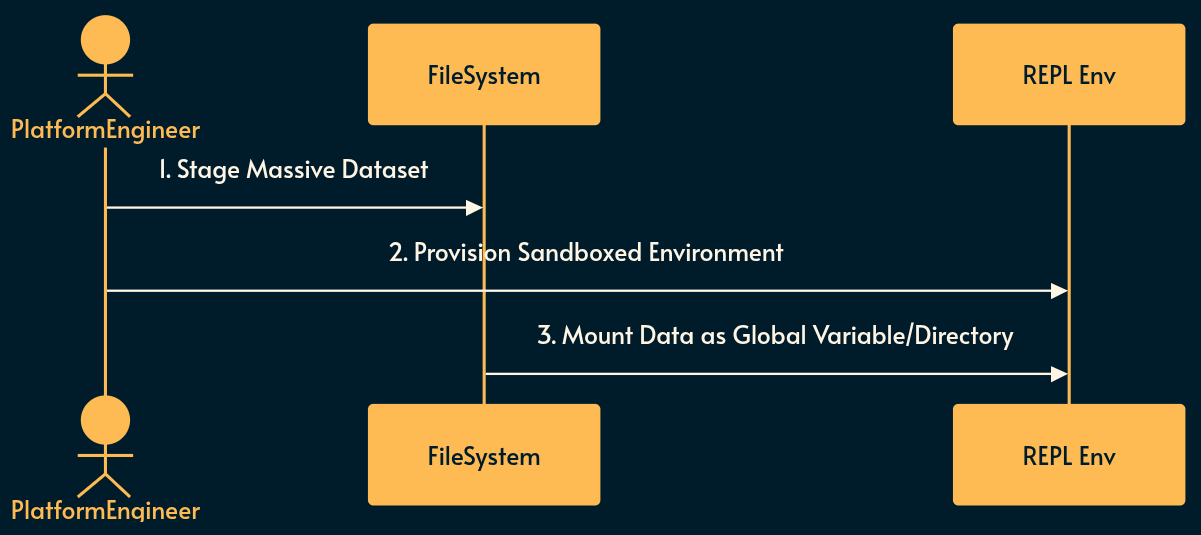
Because RLM executes code recursively against massive datasets, a secure execution environment must be prepared.
Environment Provisioning: A sandboxed REPL environment (e.g., a Docker container or Firecracker microVM) is set up with necessary runtimes (Python, Node.js, etc.).
Data Staging: The massive dataset (e.g., an entire repository or gigabytes of legal documents) is staged on a fast local filesystem.
Variable Mounting: The dataset is mounted into the REPL environment as an accessible global variable or directory structure.
Using RLM
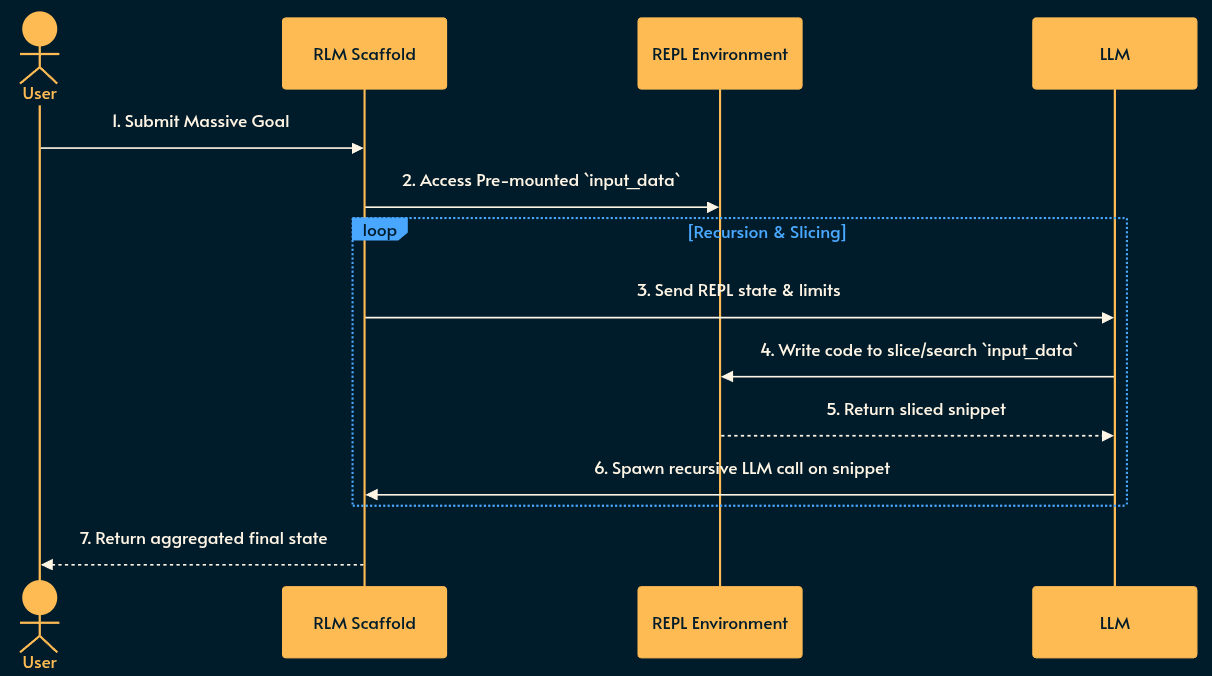
The LLM is given access into the secure environment to recursively explore the data.
Scaffolding: The system prompt contains instructions explaining the REPL environment, its capabilities, and the overarching goal.
Programmatic Peeking: The LLM writes code to peek into, search, or slice the massive variable mounted in the environment.
Recursive Invocation: The LLM writes programs that recursively spawn new instances of itself to process the sliced snippets of the prompt/data in parallel.
Aggregation: The recursive calls collapse back up the stack, aggregating findings, and the final state/variable is returned to the user.
Pros and Cons of RLM
Pros: Unblocks processing of virtually infinite context sizes. Drastically improves accuracy on large datasets compared to simple chunk-and-search RAG. Allows the LLM to dynamically determine its own data traversal strategy.
Cons: Non-deterministic execution paths can lead to infinite recursion or runaway API costs; highly complex to observe and debug; latency is extremely high due to multiple sequential and parallel LLM invocations.
RLM Use case
Use RLM for massive, complex reasoning tasks that require global context comprehension—such as refactoring an entire monorepo, analyzing a 10,000-page legal discovery dump, Epstin Files, or finding deeply buried logic bugs in large datasets where standard RAG vector searches fail to capture structural nuance.
Don’t use RLM for any synchronous, user-facing chat applications, simple text summarization, or environments where strict cost controls and low latency are required.
My monetization strategy is to give away most content for free but these posts take anywhere from a few hours to a few days to draft, edit, research, illustrate, and publish. I pull these hours from my private time, vacation days and weekends. The simplest way to support this work is to like, subscribe and share it. If you really want to support me lifting our community, you can consider a paid subscription. If you want to save, you can get 20% off via this link. As a token of appreciation, subscribers get full access to the Pro-Tips sections and my online book Reliability Engineering Mindset. Your contribution also funds my open-source products like Service Level Calculator. You can also invite your friends to gain free access.
And to those of you who already support me: thank you for sponsoring this content for others. 🙌 If you have questions or feedback, or want me to dig deeper into something, please let me know in the comments.
Further reading
Skills vs Dynamic MCP Loadouts, Armin Ronacher, 2025-12-13
RLM: The Ultimate Evolution of AI? Recursive Language Models, Gao Dalie, 2026-01-13